
Sony CDX-GT540UI Front Panel Replacement

Odelkys Marquez and 4 other contributors
Last updated on Jan 10, 2015
Views: 3.5K
View statistics:
- Past 24 Hours:
- 3
- Past 7 Days:
- 18
- Past 30 Days:
- 104
- All Time:
- 3,532
Comments: 4
4 comments on steps.
Completed: 2 3
2 people have marked this guide "completed." Will you be next?
3 people have marked this guide "completed." Including you — great job!
Favorites: 2 3
2 people have favorited (and subscribed to) this guide. Will you be next?
3 people have favorited (and subscribed to) this guide — including you!
Introduction
Go to step 1 ↓This will be the initial step for getting into your device for repair.
Before any repair work can be done, one must remove the device from the vehicle. To do so follow this link to see a vehicle general removal of a stereo system.
What you need
Tools


-
-
-
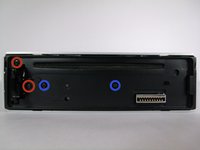
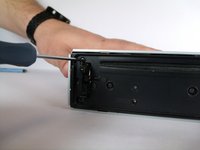
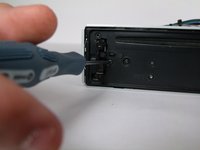
Remove two 4.9mm Phillips #00screws on the front of the device.
-
Remove two 7.5mm Phillips #00screws on the front of the device.
-
-
-
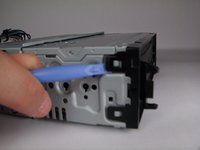
Rotate device 90 degrees to either side.
-
Use the plastic opening tool to pry open the top and bottom tab respectively.
-
Repeat on opposite side.
-
-

 Ask FixBot





To reassemble your device, follow these instructions in reverse order.
Cancel: I did not complete this guide.
2 other people completed this guide.

Team

USF Tampa, Team 10-2, Brown Fall 2014 Member of USF Tampa, Team 10-2, Brown Fall 2014
USFT-BROWN-F14S10G2
3 Members
84 Guides authored
