Free Shipping on Domestic Orders $75+

Sony BDP-s7200 Front Panel Cover Replacement

What you need

    1. Sony BDP-s7200 Front Panel Cover Replacement, Back Cover: step 1, image 1 of 1
      • Remove the disk tray cover from the device.

      Ask FixBot
      Add Comment

    2. Sony BDP-s7200 Front Panel Cover Replacement: step 2, image 1 of 2 Sony BDP-s7200 Front Panel Cover Replacement: step 2, image 2 of 2
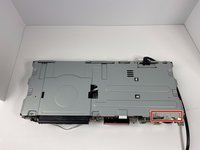
      • Using the Phillips #2 Screwdriver, remove the five 9mm from the bottom of the device.

      • Remove the metal cover.

      Ask FixBot

      Add Comment

    3. Sony BDP-s7200 Front Panel Cover Replacement: step 3, image 1 of 2 Sony BDP-s7200 Front Panel Cover Replacement: step 3, image 2 of 2
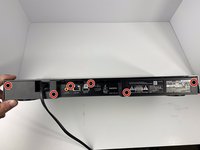
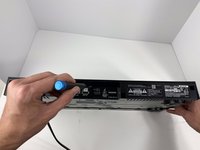
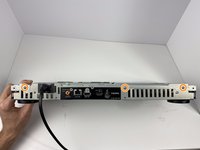
      • Using the Phillips #2 Screwdriver, remove the six 9mm screws from the back of the device.

      Ask FixBot

      Add Comment

    4. Sony BDP-s7200 Front Panel Cover Replacement: step 4, image 1 of 1
      • Pull off the back panel and remove it from the device.

      Ask FixBot

      Add Comment

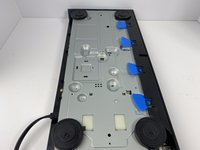
    1. Sony BDP-s7200 Front Panel Cover Replacement, Front Panel Cover: step 5, image 1 of 3 Sony BDP-s7200 Front Panel Cover Replacement, Front Panel Cover: step 5, image 2 of 3 Sony BDP-s7200 Front Panel Cover Replacement, Front Panel Cover: step 5, image 3 of 3
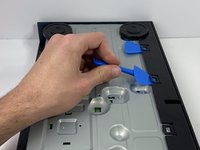
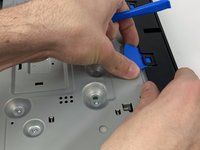
      • Using the plastic opening tool, open one of the tabs on the bottom of the device.

      • While keeping the tab open, insert a opening pick in between the opening tool and tab.

      • Repeat this for the 3 other tabs.

      Ask FixBot

      Add Comment

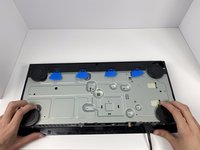
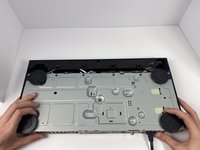
    2. Sony BDP-s7200 Front Panel Cover Replacement: step 6, image 1 of 2 Sony BDP-s7200 Front Panel Cover Replacement: step 6, image 2 of 2
      • Place your hands on the two black circles on the bottom of the device.

      • Pull on the black circles to remove the device from its front panel cover.

      Ask FixBot

      Add Comment

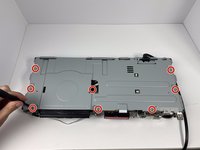
    3. Sony BDP-s7200 Front Panel Cover Replacement: step 7, image 1 of 3 Sony BDP-s7200 Front Panel Cover Replacement: step 7, image 2 of 3 Sony BDP-s7200 Front Panel Cover Replacement: step 7, image 3 of 3
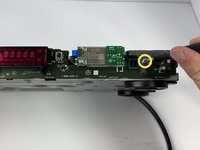
      • Using the Phillips #2 Screwdriver, remove the seven 9mm screws from the top of the device.

      • Using the same screwdriver, remove the three 9mm screws from the back of the device.

      • Using the same screwdriver, remove the one 9mm screw still connecting the small metal clip to the front of the device.

      Ask FixBot

      Add Comment

    4. Sony BDP-s7200 Front Panel Cover Replacement: step 8, image 1 of 2 Sony BDP-s7200 Front Panel Cover Replacement: step 8, image 2 of 2
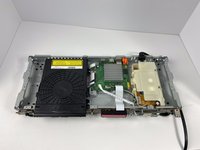
      • Remove the small metal clip on the front of the device.

      • Remove the metal cover on the top of the device.

      Ask FixBot

      Add Comment

Conclusion

To reassemble your device, follow these instructions in reverse order.

Cancel: I did not complete this guide.

One other person completed this guide.

Mitchell Novak

Member since: 01/16/20

886 Reputation

5 Guides authored

0 Guide Comments

Add Comment

View Statistics:

Past 24 Hours: 0

Past 7 Days: 6

Past 30 Days: 36

All Time: 550