15% Off Selected iFixit Tools — Limited Time
Free Shipping on Domestic Orders $75+

Sony BDP-S3700 Wi-Fi Module Replacement

What you need

  1. Sony BDP-S3700 Wi-Fi Module Replacement, Front Panel: step 1, image 1 of 2 Sony BDP-S3700 Wi-Fi Module Replacement, Front Panel: step 1, image 2 of 2
    • Use the PH1 screwdriver to remove the two 9mm screws on the back of the Blu-ray player.

    Ask FixBot

    Add Comment

  2. Sony BDP-S3700 Wi-Fi Module Replacement: step 2, image 1 of 2 Sony BDP-S3700 Wi-Fi Module Replacement: step 2, image 2 of 2
    • Remove the back of the device by slowly sliding the rear outer housing backwards.

    Ask FixBot

    Add Comment

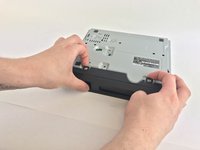
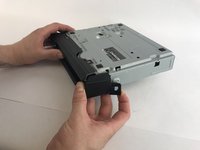
  3. Sony BDP-S3700 Wi-Fi Module Replacement: step 3, image 1 of 2 Sony BDP-S3700 Wi-Fi Module Replacement: step 3, image 2 of 2
    • Turn the Blu-ray over

    • Pry open the clips under and on the sides

    Ask FixBot

    Add Comment

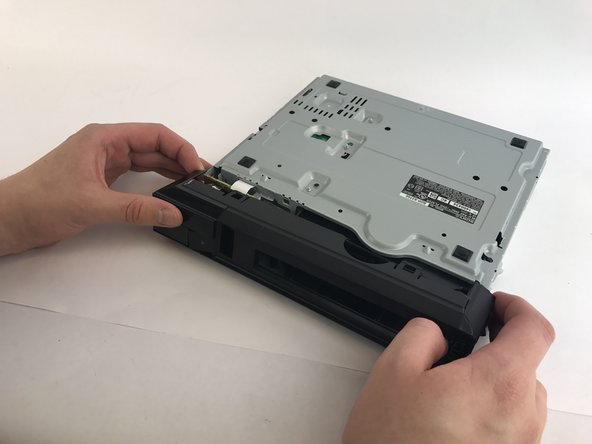
  4. Sony BDP-S3700 Wi-Fi Module Replacement: step 4, image 1 of 1
    • Once all the clips are open, slide the front outer housing out.

    Ask FixBot

    Add Comment

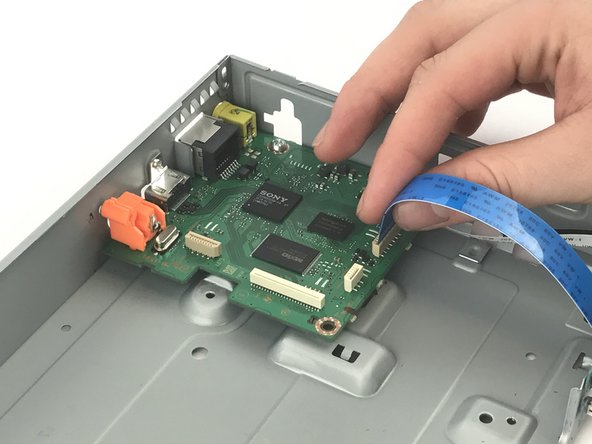
  5. Sony BDP-S3700 Wi-Fi Module Replacement, Port Board: step 5, image 1 of 1
    • Flip the Blu-ray back up

    • Remove the ribbon connecting the port board to the motherboard.

    • Handle the circuits only on its side.

    Ask FixBot

    Add Comment

  6. Sony BDP-S3700 Wi-Fi Module Replacement: step 6, image 1 of 1
    • Use the PH1 to remove the 7mm screw on the port board.

    Ask FixBot

    Add Comment

  7. Sony BDP-S3700 Wi-Fi Module Replacement: step 7, image 1 of 1
    • Remove the port board.

    Ask FixBot

    Add Comment

  8. Sony BDP-S3700 Wi-Fi Module Replacement, Wi-Fi Module: step 8, image 1 of 1
    • Remove the ribbon connecting the Wi-Fi module to the motherboard.

    Ask FixBot

    Add Comment

  9. Sony BDP-S3700 Wi-Fi Module Replacement: step 9, image 1 of 1
    • Use the PH1 screwdriver to remove the 7mm screw on the module.

    Ask FixBot

    Add Comment

  10. Sony BDP-S3700 Wi-Fi Module Replacement: step 10, image 1 of 1
    • Remove the Wi-Fi module

    Ask FixBot

    Add Comment

Conclusion

To reassemble your device, follow these instructions in reverse order.

Cancel: I did not complete this guide.

3 other people completed this guide.

Luiz Barreto

Member since: 02/15/17

645 Reputation

5 Guides authored

Team

USF Tampa, Team 12-1, Eyestone Spring 2017 Member of USF Tampa, Team 12-1, Eyestone Spring 2017

USFT-EYESTONE-S17S12G1

4 Members

5 Guides authored

0 Guide Comments

Add Comment

View Statistics:

Past 24 Hours: 2

Past 7 Days: 6

Past 30 Days: 12

All Time: 909