Sony Alpha NEX-3N LCD assembly Replacement

What you need

  1. Sony Alpha NEX-3N LCD assembly Replacement, Getting Started: step 1, image 1 of 2 Sony Alpha NEX-3N LCD assembly Replacement, Getting Started: step 1, image 2 of 2
    • Remove battery and card

  2. Sony Alpha NEX-3N LCD assembly Replacement, Back Case 1: step 2, image 1 of 3 Sony Alpha NEX-3N LCD assembly Replacement, Back Case 1: step 2, image 2 of 3 Sony Alpha NEX-3N LCD assembly Replacement, Back Case 1: step 2, image 3 of 3
    • Right side, remove 1 M1.4x3.7 screw

    • Left side, remove 3 M1.4x3.7 screws

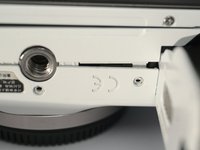
    • Bottom side, remove 5 M1.4x3.7 screws, including 2 in battery bay. 2 of them out of this photo, you can find them.

    • Do NOT touch screws on the bottom of LCD assembly.

  3. Sony Alpha NEX-3N LCD assembly Replacement, Back Case 2: step 3, image 1 of 1
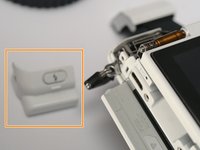
    • Pop the flash.

    • In flash room, remove 1 (one) M1.4x3.8 black screw.

  4. Sony Alpha NEX-3N LCD assembly Replacement, Back Case 3: step 4, image 1 of 3 Sony Alpha NEX-3N LCD assembly Replacement, Back Case 3: step 4, image 2 of 3 Sony Alpha NEX-3N LCD assembly Replacement, Back Case 3: step 4, image 3 of 3
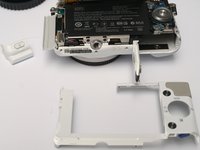
    • Remove LCD hinge cover, by sliding to the left.

    • Remove back cover, actually just a plastic frame.

  5. Sony Alpha NEX-3N LCD assembly Replacement, LCD assembly: step 5, image 1 of 2 Sony Alpha NEX-3N LCD assembly Replacement, LCD assembly: step 5, image 2 of 2
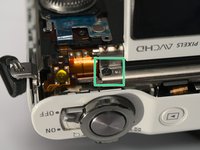
    • Remove 1 M1.4x2 screw

    • Remove another M1.4x2 screw, sorry for the angle.

  6. Sony Alpha NEX-3N LCD assembly Replacement, LCD Assembly: step 6, image 1 of 3 Sony Alpha NEX-3N LCD assembly Replacement, LCD Assembly: step 6, image 2 of 3 Sony Alpha NEX-3N LCD assembly Replacement, LCD Assembly: step 6, image 3 of 3
    • CAUTION. Sony makes world's MOST BRITTLE FPC!

    • Loosen LCD assemble with caution!

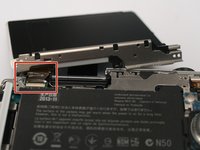
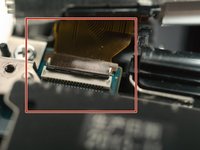
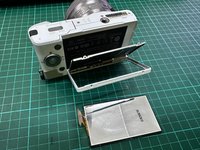
    • Release FPC cable, the connector is flip type.

  7. Sony Alpha NEX-3N LCD assembly Replacement, The LCD assembly: step 7, image 1 of 1
    • The LCD assembly

  8. Sony Alpha NEX-3N LCD assembly Replacement, Dismantle the LCD Part: step 8, image 1 of 3 Sony Alpha NEX-3N LCD assembly Replacement, Dismantle the LCD Part: step 8, image 2 of 3 Sony Alpha NEX-3N LCD assembly Replacement, Dismantle the LCD Part: step 8, image 3 of 3
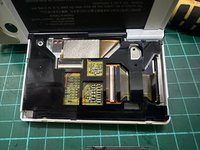
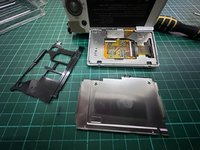
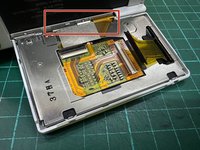
    • After unscrew 4pcs screw you will remove the steel black plate, then slowly pull the black frame there to see the ribbon stripe.

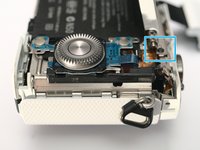
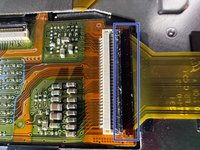
    • Slowly pull the very fragile ribbon lock which i marking with the blue boxes. around just 1mm to unlock the ribbon.. unlucky i broke mine..

  9. Sony Alpha NEX-3N LCD assembly Replacement, Dismantle the LCD Part: step 9, image 1 of 3 Sony Alpha NEX-3N LCD assembly Replacement, Dismantle the LCD Part: step 9, image 2 of 3 Sony Alpha NEX-3N LCD assembly Replacement, Dismantle the LCD Part: step 9, image 3 of 3
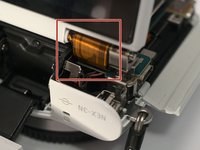
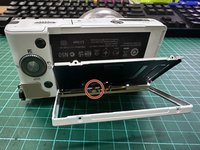
    • you can see the ribbon already pull out but be carefull with the others 2 ribbon when your try to pull out this ribbon.

    • the the circle marker that show others ribbon you need to be carefull. goodluck!

Conclusion

To reassemble your device, follow these instructions in reverse order.

Terrance

Member since: 11/17/09

6,765 Reputation

18 Guides authored

2 Guide Comments

Where can i get a lcd screen replacement?

Searched everywhere even AliExpress they do not sell the replacement lcd for this model

adfa dad - Reply
No idea. I broke 2 FPC and lost some lens contact springs, got no where to buy, planning to replace the FPCs, but too busy these days .........

Terrance -
Add Comment

View Statistics:

Past 24 Hours: 0

Past 7 Days: 16

Past 30 Days: 64

All Time: 2,439