Free Shipping on Domestic Orders $75+

Sony Alpha ILCE-6000 E-mount Replacement

What you need

    1. Sony Alpha ILCE-6000 E-mount Replacement, Lens: step 1, image 1 of 1
      • Turn of camera by turning the switch to OFF.

      Ask FixBot

      Add Comment

    2. Sony Alpha ILCE-6000 E-mount Replacement: step 2, image 1 of 1
      • Use the finger, press and hold the release black circle button ( on the bottom ) next to the lens on the front of the camera.

      Ask FixBot

      Add Comment

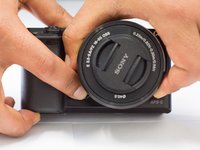
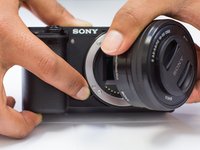
    3. Sony Alpha ILCE-6000 E-mount Replacement: step 3, image 1 of 2 Sony Alpha ILCE-6000 E-mount Replacement: step 3, image 2 of 2
      • Using the left hand or the right hand to hold the camera body, other hand twist the lens counterclockwise and pull it off.

      • Align the white dot of the lens to the white dot on the camera mount to completely replace.

      Ask FixBot

      Add Comment

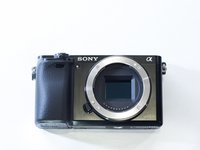
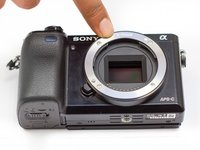
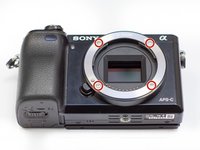
    1. Sony Alpha ILCE-6000 E-mount Replacement, E-mount Replacement: step 4, image 1 of 2 Sony Alpha ILCE-6000 E-mount Replacement, E-mount Replacement: step 4, image 2 of 2
      • Locate the E-mount on the front of the camera

      Ask FixBot

      Add Comment

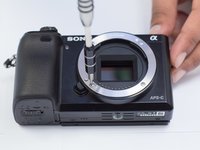
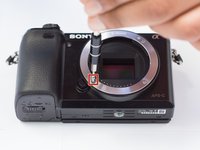
    2. Sony Alpha ILCE-6000 E-mount Replacement: step 5, image 1 of 3 Sony Alpha ILCE-6000 E-mount Replacement: step 5, image 2 of 3 Sony Alpha ILCE-6000 E-mount Replacement: step 5, image 3 of 3
      • Take a Philips head 00 screw to remove the four of the 5.1mm screws located on the E-mount.

      Ask FixBot

      Add Comment

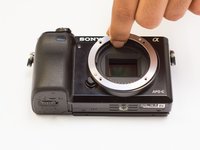
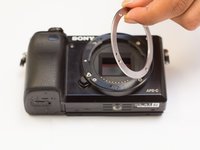
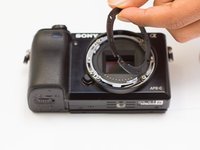
    3. Sony Alpha ILCE-6000 E-mount Replacement: step 6, image 1 of 3 Sony Alpha ILCE-6000 E-mount Replacement: step 6, image 2 of 3 Sony Alpha ILCE-6000 E-mount Replacement: step 6, image 3 of 3
      • After removing the screws, pull off the E-mount metal ring gently and wiggle it until its free.

      • Remove the plastic ring located under the metal ring.

      • Do not remove the metal piece that is located behind the plastic ring.

      Ask FixBot

      Add Comment

    4. Sony Alpha ILCE-6000 E-mount Replacement: step 7, image 1 of 1
      • Replace the plastic E-mount ring with a new one.

      Ask FixBot

      Add Comment

Conclusion

To reassemble your device, follow these instructions in reverse order.

Cancel: I did not complete this guide.

Yirga Yilma

Member since: 02/02/17

251 Reputation

2 Guides authored

Team

UW Tacoma, Team 1-4, Rose Winter 2017 Member of UW Tacoma, Team 1-4, Rose Winter 2017

UWT-ROSE-W17S1G4

4 Members

10 Guides authored

2 Guide Comments

Hello folks,

actually I have to replace the E-mount ring my ILCE-6000, which seems very easy with this description. Thanks a lot for this!

Is the ring available anywhere on this globe? I would truly appreciate any hint.

Best regards, JDK

JDK - Reply Share

Hi there, found a source for the ring as original part. The price is reasonable. Now waiting for delivery ...

Best regards, JDK

JDK - Reply Share

Add Comment

View Statistics:

Past 24 Hours: 2

Past 7 Days: 11

Past 30 Days: 71

All Time: 5,198