Introduction
If the device is having poor front camera performance, consider replacing the front camera of the Sky 6.0Q phone. Replacement of the front camera of the device can be needed if the camera is not working, giving blurry or dark images, has lens damage, or if the lens is exposed to water. The design of the Sky 6.0Q phone makes accessing the front camera difficult, so it is necessary to be careful when removing the back plates and to not lose the small screws. It is recommended to use a magnetic work board to keep the screws from rolling away and are always on hand once the camera is replaced. Although removing the front camera is not hazardous, be careful of disrupting other components that could be hazardous while replacing.
What you need
-
-
-
Use the #00 Phillips screwdriver to remove the two 3 mm screws at the bottom of the backplate.
-
Pry off the back plate with the spudger.
 Ask FixBot
-
-
-
After removing back panel, remove all ten 3mm screws with the #00 Phillips screwdriver from the black plastic casing so it can be removed.
-
-
-
-
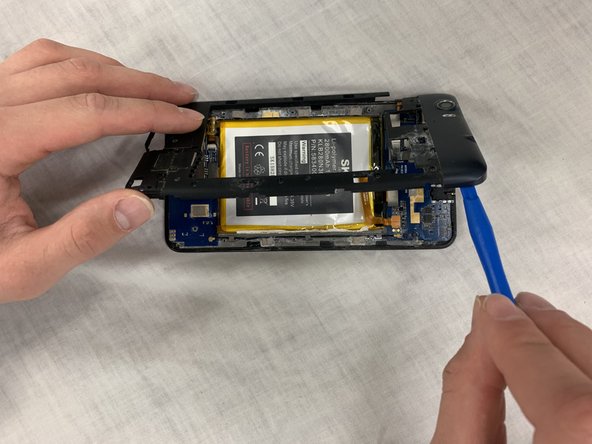
Use the plastic opening tool to help pry up the plastic backing.
-
Once loose, remove the plastic backing to expose underlying electronic components.
-
-
-
Disconnect the electronic adapter connecting the camera to the top mother board.
-
Once disconnected, remove the camera and replace with new camera. If necessary, use the spudger to help remove the camera.
-
-




To reassemble your device, follow these instructions in reverse order.
Cancel: I did not complete this guide.
One other person completed this guide.

Team

IUPUI, Team S1-G3, Hovde Fall 2018 Member of IUPUI, Team S1-G3, Hovde Fall 2018
IUPUI-HOVDE-F18S1G3
3 Members
48 Guides authored
