15% Off Selected iFixit Tools — Limited Time
Free Shipping on Domestic Orders $75+

Sharp LC-42D62U T-Con Board Replacement

What you need

  1. Sharp LC-42D62U  T-Con Board Replacement, Remove the SD card cover: step 1, image 1 of 1
    • To replace the T-Con board it is not necessary to remove the base.

    • Lay the the TV flat on a padded surface.

    Ask FixBot

    Add Comment

  2. Sharp LC-42D62U  T-Con Board Replacement, Detach the rear cover: step 2, image 1 of 1
    • Remove 17 screws.

    Ask FixBot

    Add Comment

  3. Sharp LC-42D62U  T-Con Board Replacement, Remove the stand fixing angle: step 3, image 1 of 1
    • To reassemble all the parts easily, mark with a permanent marker the location of the screws you are removing.

    • 4 screws hold the nd fixing angle.

    Ask FixBot

    Add Comment

  4. Sharp LC-42D62U  T-Con Board Replacement, Remove left and right center angles: step 4, image 1 of 1
    • 2 screws hold each center angles.

    Ask FixBot

    Add Comment

  5. Sharp LC-42D62U  T-Con Board Replacement, Remove the main shield: step 5, image 1 of 1
    • 9 screws.

    Ask FixBot

    Add Comment

  6. Sharp LC-42D62U  T-Con Board Replacement, Disconnect connectors: step 6, image 1 of 1
    • Insert wisdom here.

    Ask FixBot

    Add Comment

  7. Sharp LC-42D62U  T-Con Board Replacement, Remove the tray chassis: step 7, image 1 of 1
    • 7 screws.

    Ask FixBot

    Add Comment

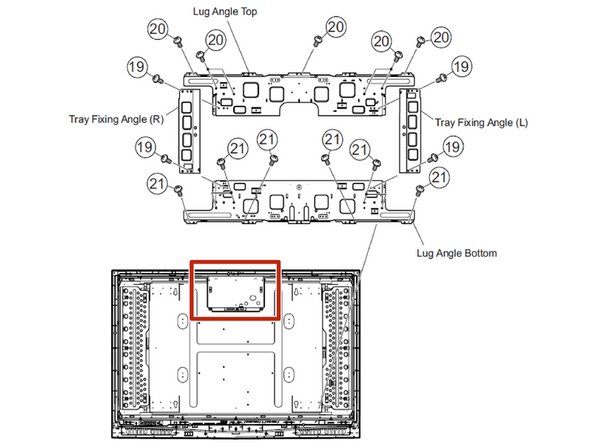
  8. Sharp LC-42D62U  T-Con Board Replacement, Remove the tray fixing angles and the lug angle top: step 8, image 1 of 1
    • Remove the 7 screws holding the lug angle top.

    • Then remove only the bottom screws from the tray fixing angles, leaving the top screws attached to the lug angle top.

    Ask FixBot

    Add Comment

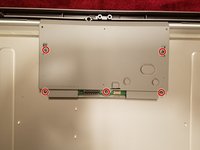
  9. Sharp LC-42D62U  T-Con Board Replacement, Remove the T-Con board shield: step 9, image 1 of 2 Sharp LC-42D62U  T-Con Board Replacement, Remove the T-Con board shield: step 9, image 2 of 2
    • 5 screws.

    Ask FixBot

    Add Comment

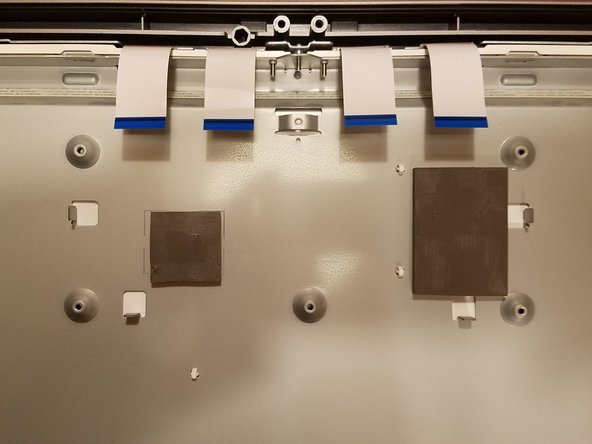
  10. Sharp LC-42D62U  T-Con Board Replacement, Remove the last screw and disconnect the 4 ribbon cables: step 10, image 1 of 1
    • To disconnect the ribbon cables, lift the brown tab on the connector.

    • Make sure the ribbons are positioned correctly in the connector when reassembling the new board.

    Ask FixBot

    Add Comment

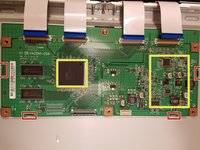
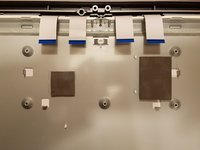
  11. Sharp LC-42D62U  T-Con Board Replacement, Remove the T-Con board: step 11, image 1 of 2 Sharp LC-42D62U  T-Con Board Replacement, Remove the T-Con board: step 11, image 2 of 2
    • There are two pads glued under the board (see yellow marks in the picture): use a heat gun to soften them and then gently pry them to detach the board from the frame.

    • There are also 4 tabs holding the board: gently pull the board to release it, after the pads are disconnected.

    • Reposition the pads on the chassis before installing the new board.

    Ask FixBot

    Add Comment

Conclusion

To reassemble your device, follow these instructions in reverse order.

Cancel: I did not complete this guide.

One other person completed this guide.

Emme

Member since: 06/15/17

927 Reputation

4 Guides authored

0 Guide Comments

Add Comment

View Statistics:

Past 24 Hours: 1

Past 7 Days: 15

Past 30 Days: 40

All Time: 1,676