
Sharp Aquos Crystal Back Panel Replacement

Felicia Imbriano and
Last updated on May 19, 2016
Views: 278
View statistics:
- Past 24 Hours:
- 0
- Past 7 Days:
- 0
- Past 30 Days:
- 5
- All Time:
- 278
Comments: 2
2 comments on steps.
Completed: 0 1
No one has marked this guide "completed." Will you be the first?
1 person has marked this guide "completed." It's you — great job!
Favorites: 0 1
No one has favorited (and subscribed to) this guide. Will you be the first?
1 person has favorited (and subscribed to) this guide — and that's you!
Prerequisite Only
This is a prerequisite-only guide! This guide is part of another procedure and isn’t meant to be used alone.
Better Introduction
Improve this guide by completing or revising its introduction.
Introduction
Go to step 1 ↓Prerequisite Only
-
-
-
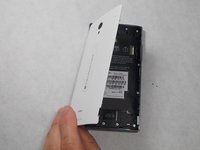
Peel back the back cover of the phone from the access point to remove it. It should come off easily using your hands.
 Ask FixBot
-
-
-



To reassemble your device, follow these instructions in reverse order.

Team

UMass Dartmouth, Team 7-4, Catania Spring 2016 Member of UMass Dartmouth, Team 7-4, Catania Spring 2016
UMASSD-CATANIA-S16S7G4
3 Members
96 Guides authored
