Free Shipping on Domestic Orders $75+

Servicing the Nintendo Wii (RVL-001) disc drive

What you need

    1. Servicing the Nintendo Wii (RVL-001) disc drive, Nintendo Wii Teardown: step 1, image 1 of 3 Servicing the Nintendo Wii (RVL-001) disc drive, Nintendo Wii Teardown: step 1, image 2 of 3 Servicing the Nintendo Wii (RVL-001) disc drive, Nintendo Wii Teardown: step 1, image 3 of 3
      • Disconnect all external cords from the Wii console.

      • Gather all tools.

      Ask FixBot

      Add Comment

    2. Servicing the Nintendo Wii (RVL-001) disc drive: step 2, image 1 of 3 Servicing the Nintendo Wii (RVL-001) disc drive: step 2, image 2 of 3 Servicing the Nintendo Wii (RVL-001) disc drive: step 2, image 3 of 3
      • One small screw holds the BIOS memory battery.

      • Once that screw is removed, you can slide out the plastic slot.

      Ask FixBot

      Add Comment

    3. Servicing the Nintendo Wii (RVL-001) disc drive: step 3, image 1 of 2 Servicing the Nintendo Wii (RVL-001) disc drive: step 3, image 2 of 2
      • Remove these three black case screws. The one on the right is a few mm longer. These screws hold on the black plastic cover for the GameCube ports.

      Ask FixBot

      Add Comment

    4. Servicing the Nintendo Wii (RVL-001) disc drive: step 4, image 1 of 2 Servicing the Nintendo Wii (RVL-001) disc drive: step 4, image 2 of 2
      • Lift off the black plastic plate.

      • There are four screws: two Phillips #00 and two Tri-Wing.

      Ask FixBot

      Add Comment

    5. Servicing the Nintendo Wii (RVL-001) disc drive: step 5, image 1 of 3 Servicing the Nintendo Wii (RVL-001) disc drive: step 5, image 2 of 3 Servicing the Nintendo Wii (RVL-001) disc drive: step 5, image 3 of 3
      • Remove all screws from the case.

      • Some screws are under rubber feet, or small, square paper screw covers (red square). I used a sharp metal tool to get under the screw covers. You could use an X-acto knife.

      • Several case screws require a Tri-Wing screwdriver.

      • The next step has more pictures of removing rubber feet and the screws underneath. The feet and screwcovers are self-adhesive, but not every foot or screwcover has a screw.

      Ask FixBot

      Add Comment

    6. Servicing the Nintendo Wii (RVL-001) disc drive: step 6, image 1 of 3 Servicing the Nintendo Wii (RVL-001) disc drive: step 6, image 2 of 3 Servicing the Nintendo Wii (RVL-001) disc drive: step 6, image 3 of 3
      • Remove rubber feet and screws underneath.

      Ask FixBot

      Add Comment

    7. Servicing the Nintendo Wii (RVL-001) disc drive: step 7, image 1 of 3 Servicing the Nintendo Wii (RVL-001) disc drive: step 7, image 2 of 3 Servicing the Nintendo Wii (RVL-001) disc drive: step 7, image 3 of 3
      • Careful! If you don't remove the feet and the screws underneath before you try to pull off the front panel, the tab can split!

      • Once all screws are removed, you should be able to pull off the front drive panel.

      • The wire connecting the front panel (green squares in the third image) can be pulled out gently by hand or with the help of a spudger.

      Ask FixBot

      Add Comment

    8. Servicing the Nintendo Wii (RVL-001) disc drive: step 8, image 1 of 3 Servicing the Nintendo Wii (RVL-001) disc drive: step 8, image 2 of 3 Servicing the Nintendo Wii (RVL-001) disc drive: step 8, image 3 of 3
      • Now the case can be pulled apart.

      Ask FixBot

      Add Comment

    9. Servicing the Nintendo Wii (RVL-001) disc drive: step 9, image 1 of 3 Servicing the Nintendo Wii (RVL-001) disc drive: step 9, image 2 of 3 Servicing the Nintendo Wii (RVL-001) disc drive: step 9, image 3 of 3
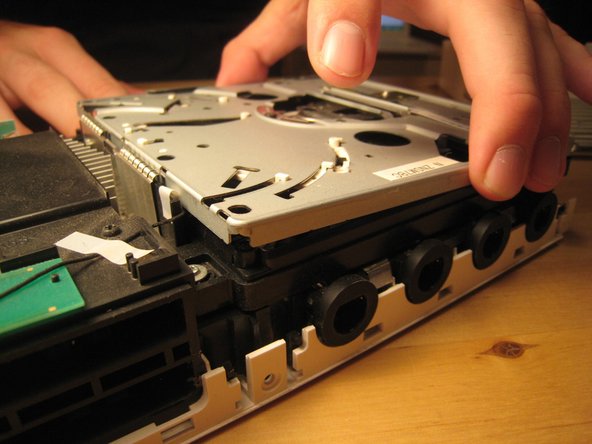
      • We lifted up the cover of the optical drive by removing the six Phillips #00 screws. These are all labeled on the previous image.

      • Because of a secured wire leading to the drive, we reattached the cover to facilitate the remove of the entire drive assembly without harming any of the electronics.

      • There are a ton of parts in the optical drive, but there is nothing very fancy about this drive compared to other slot-loading drives, so I didn't take it apart completely. There are also a ton of gears and levers that I did not want to deal with.

      Ask FixBot

      Add Comment

    10. Servicing the Nintendo Wii (RVL-001) disc drive: step 10, image 1 of 3 Servicing the Nintendo Wii (RVL-001) disc drive: step 10, image 2 of 3 Servicing the Nintendo Wii (RVL-001) disc drive: step 10, image 3 of 3
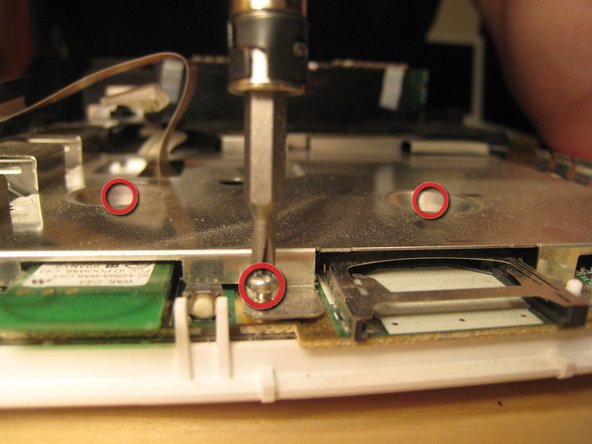
      • The screws holding in the drive were deep within the casing.

      • Once those screws were removed, the entire case could be lifted off.

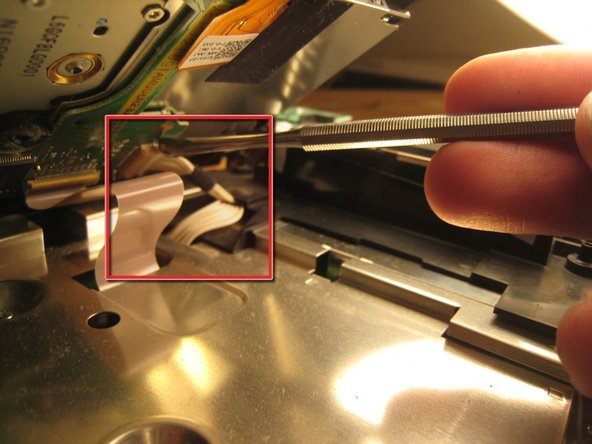
      • Don't pull too hard! There are two cables attaching the drive to the logic board underneath.

      • This wire slid out from its horizontal slot. Once it was detached, the ribbon cable came out as well.

      Ask FixBot

      Add Comment

    11. Servicing the Nintendo Wii (RVL-001) disc drive: step 11, image 1 of 2 Servicing the Nintendo Wii (RVL-001) disc drive: step 11, image 2 of 2
      • With those wires detached, the optical drive came off completely.

      Ask FixBot

      Add Comment

    12. Servicing the Nintendo Wii (RVL-001) disc drive: step 12, image 1 of 2 Servicing the Nintendo Wii (RVL-001) disc drive: step 12, image 2 of 2
      • We begin trying to get to the logic board by removing this small black plastic rim.

      • Once within the case, all screws are Phillips #00. There are marked on the logic board with arrows, triangles, boxes, and crosses. From what I can tell, an arrow means that it just goes through the logic board cover. A triangle means that it is a longer logic board cover screw. A cross means that it holds on a plastic piece, and a box means that it holds on another EM shield / or heat sink.

      Ask FixBot

      Add Comment

    13. Servicing the Nintendo Wii (RVL-001) disc drive: step 13, image 1 of 3 Servicing the Nintendo Wii (RVL-001) disc drive: step 13, image 2 of 3 Servicing the Nintendo Wii (RVL-001) disc drive: step 13, image 3 of 3
      • Remove all screws from the logic board cover. Two are recessed in the middle; others are along the edge. More will become visible as other parts are removed. It's like a game! You can start with the screws holding in the black plastic pieces, but I started with the most visible and went from there.

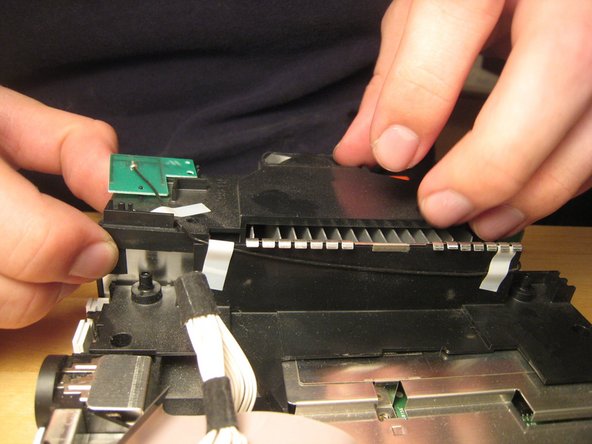
      • There are two wires (shown in the third picture) coming from the logic board and connected to the Wi-Fi antennas. These are delicate. Do not break them.

      Ask FixBot

      Add Comment

    14. Servicing the Nintendo Wii (RVL-001) disc drive: step 14, image 1 of 2 Servicing the Nintendo Wii (RVL-001) disc drive: step 14, image 2 of 2
      • Take out these screws in the black plastic casing.

      Ask FixBot

      Add Comment

    15. Servicing the Nintendo Wii (RVL-001) disc drive: step 15, image 1 of 2 Servicing the Nintendo Wii (RVL-001) disc drive: step 15, image 2 of 2
      • Detach the case fan. There are two screws holding it in.

      • You must detach the power connector for the fan if you want to remove it completely.

      Ask FixBot

      Add Comment

    16. Servicing the Nintendo Wii (RVL-001) disc drive: step 16, image 1 of 2 Servicing the Nintendo Wii (RVL-001) disc drive: step 16, image 2 of 2
      • If your screwdriver is not magnetized, you will need a magnet to get out some of the embedded screws. You can hold a magnet against your screwdriver shaft to temporarily magnetize it.

      • Once all the screws out, you can begin to remove the black casing.

      Ask FixBot

      Add Comment

    17. Servicing the Nintendo Wii (RVL-001) disc drive: step 17, image 1 of 3 Servicing the Nintendo Wii (RVL-001) disc drive: step 17, image 2 of 3 Servicing the Nintendo Wii (RVL-001) disc drive: step 17, image 3 of 3
      • With the black plastic covers off, we can see all the screw holes. Most of the screws are out by now, but once the rest of them are out, you can lift off the logic board cover.

      • Note that at least one part is thermal padded to the logic board cover. You might have to replace this thermal pad, but I didn't. I just pushed them back together. Oh well!

      • Remove any remaining screws in the logic board cover.

      Ask FixBot

      Add Comment

    18. Servicing the Nintendo Wii (RVL-001) disc drive: step 18, image 1 of 3 Servicing the Nintendo Wii (RVL-001) disc drive: step 18, image 2 of 3 Servicing the Nintendo Wii (RVL-001) disc drive: step 18, image 3 of 3
      • Once all screws are removed, lift off the logic board cover.

      Ask FixBot

      Add Comment

    19. Servicing the Nintendo Wii (RVL-001) disc drive: step 19, image 1 of 3 Servicing the Nintendo Wii (RVL-001) disc drive: step 19, image 2 of 3 Servicing the Nintendo Wii (RVL-001) disc drive: step 19, image 3 of 3
      • Look around.

      • This is the thermal padding.

      • We opted not to remove the heat sink from the logic board, but it certainly could be removed.

      Ask FixBot

      Add Comment

    20. Servicing the Nintendo Wii (RVL-001) disc drive: step 20, image 1 of 3 Servicing the Nintendo Wii (RVL-001) disc drive: step 20, image 2 of 3 Servicing the Nintendo Wii (RVL-001) disc drive: step 20, image 3 of 3
      • Take some more awesome photos.

      Ask FixBot

      Add Comment

    21. Servicing the Nintendo Wii (RVL-001) disc drive: step 21, image 1 of 3 Servicing the Nintendo Wii (RVL-001) disc drive: step 21, image 2 of 3 Servicing the Nintendo Wii (RVL-001) disc drive: step 21, image 3 of 3
      • And take a couple more photos.

      Ask FixBot

      Add Comment

    22. Servicing the Nintendo Wii (RVL-001) disc drive: step 22, image 1 of 2 Servicing the Nintendo Wii (RVL-001) disc drive: step 22, image 2 of 2
      • We stopped there.

      • A muffin tin worked really well to organize all the screws.

      • Putting the Wii back together took only about half an hour, and it works perfectly. We improved Nintendo's design by three or four screws and one square nut, but worsened their design by one piece of duct tape (to hold in the bios battery).

      Ask FixBot

      Add Comment

Conclusion

Disassemble following that awesome person's guide to step 11. To reassemble the DISC DRIVE, follow these instructions in reverse order. To reassemble your WII CONSOLE, follow the above referenced guide in reverse order.

Cancel: I did not complete this guide.

One other person completed this guide.

M0m0

Member since: 08/26/23

88 Reputation

1 Guide authored

2 Guide Comments

Ummm... this is technically a teardown, not a replacement guide. I think for the sake of lessening confusion it should be moved to the teardown section. Great guide, though, don't get me wrong. It's just in the wrong place.

Fixer of Stuff - Reply Share

"I'm not going to cover opening your Wii as there's already great guides on here for those"
>proceeds to talk almost exclusively about opening the wii

Jilvenhong Dickinson - Reply Share

Add Comment

View Statistics:

Past 24 Hours: 29

Past 7 Days: 115

Past 30 Days: 582

All Time: 20,426