Introduction
This guide will assist users to replace a damaged or nonoperational jog button.
What you need
-
-
Start by removing the screen bezel.
-
Use a pair of spudgers to pry between the bezel and the rest of the monitor.
-
lay monitor on its back and pull off screen cover.
-
-


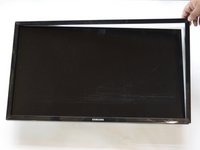


To reassemble your device, follow these instructions in reverse order. Ensure the bezel completely snaps in place all around monitor.
Cancel: I did not complete this guide.
3 other people completed this guide.



Team

Cal Poly, Team S11-G1, Banghart Winter 2018 Member of Cal Poly, Team S11-G1, Banghart Winter 2018
CPSU-BANGHART-W18S11G1
4 Members
6 Guides authored
5 Guide Comments
Does anyone have the part number or where I can buy the new jog button?
“bn96-32135b “
the button on my monitor wasn't working anymore - pressing it didn't do anything. So I decided to follow this great guide. When I removed the top of the button and put it on again, I noticed that it worked again. Seems that there had been just to many dust.
Thanx for this guide!
