
Samsung Stratosphere Display Replacement

William Lai and 5 other contributors
Last updated on May 7, 2024
Views: 5.2K
View statistics:
- Past 24 Hours:
- 2
- Past 7 Days:
- 14
- Past 30 Days:
- 74
- All Time:
- 5,218
Comments: 5
4 comments on steps, 1 guide comment.
Go to guide commentsCompleted: 13 14
13 people have marked this guide "completed." Will you be next?
14 people have marked this guide "completed." Including you — great job!
Favorites: 7 8
7 people have favorited (and subscribed to) this guide. Will you be next?
8 people have favorited (and subscribed to) this guide — including you!
Featured Guide
This guide has been found to be exceptionally cool by the iFixit staff.
Featured Student Guide
This guide has been the hard work of our awesome students and is found to be exceptionally cool by the iFixit staff.
Introduction
Go to step 1 ↓This guide will show you how to detach and replace the phone's touchscreen display.
What you need
Tools


-
-
-
Using your fingers, pry along the groove at the top of the phone.
-
Pull back on the rear casing until it comes free from the device.
-
The casing will make a cracking sound as it is removed.
 Ask FixBot
-
-
-
With your fingers, pry from the bottom of the battery to loosen it.
-
Lift away to remove the battery from the phone.
-
-
-
-
-
Locate the red and white sim card located above the battery housing.
-
Remove the sim card by sliding it downwards from its slot with your fingers.
-
-
Tool used on this step:Tweezers$4.99
-
Remove the seven silver 3mm screws securing the rear panel using the Phillips #000 screwdriver.
-
-
-
Pry around the rear panel with a plastic opening tool to loosen it.
-
Remove the rear panel from the phone with your fingers.
-
-
-
Remove the four black 3mm screws securing the motherboard with the Phillips #000 screwdriver.
-
-
-
Locate the flex cable attachment at the tab with a green arrow printed on top.
-
Pry from the side the arrow is pointing with your fingers.
-
The cable will audibly snap as it is removed from its attachment.
-
Let the cable hang loosely to the side of the phone.
-
-
-
Pull the motherboard up from the side opposite the loose flex cable.
-
Lift to remove the motherboard from the device.
-
-
-
-
-
-
Insert a plastic opening tool into any side of the phone case to separate the keyboard from the rear panel.
-
Pry the keyboard away from the casing with the plastic opening tool.
-
-
-
Remove the 7 silver 2mm screws attaching the silver metal plate to the rear panel with the Phillips #000 Screwdriver.
-
-
-
Lift the gold plate with your fingers, repositioning it to slide through the keyboard casing underneath.
-
Carefully take off the keyboard casing with your fingers.
-
The golden metal plate should fit through the wide slot of the casing.
-
-
-
Slide the silver metal plate down and away from the to the flex cable and gold metal plate.
-
-
-
Unscrew the 4 black 3mm screws from the rear panel with the Phillips #000 Screwdriver.
-
-
-
Insert the plastic opening tool into the groove at the top of the rear panel.
-
Firmly slide the plastic opening tool all around the rear panel. The panel will audibly snap as it comes apart.
-
-
-
Lift the flex cable and position it so the part containing the metal plate can come free.
-
Pull the part containing the metal plate away from the rest of the rear panel.
-
-
Tool used on this step:Tweezers$4.99
-
Use tweezers to loosen the front-facing camera from the plastic casing.
-
Pull the black rectangular piece, attached to the front facing camera, away from the rear panel.
-
-
-
-
-
Carefully peel the blue tape from the bottom of the flex cable and set it aside.
-
-
-
Use one of the plastic opening tools to loosen the flex cable from its central housing.
-
Pull lightly on the flex cable to free it from the housing.
-
The cable may audibly snap as it is freed from its attachment.
-
-
Tool used on this step:Tweezers$4.99
-
Use tweezers to loosen the flex cable and speaker from the bottom of the phone.
-
Pull upward with the tweezers and the flex cable will come loose.
-
-
-
-
-
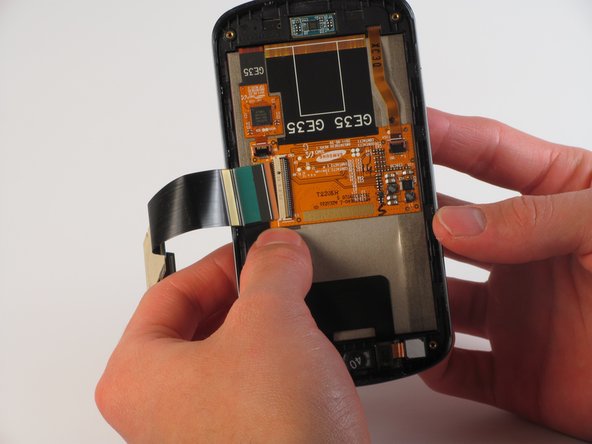
Locate the clamp holding the gold display cable to the back of the screen.
-
Using the plastic opener tool, lightly pry the cable attachment into an upright position.
-
Once completed, the attachment should resemble the marked section.
-
-
Tool used on this step:Tweezers$4.99
-
Using the tweezers, carefully pull the gold display cable to remove it from its attachment.
-
-
-
Pry around the screen with a plastic opening tool to loosen it from the frame.
-
Repeat this process as necessary; a lot of adhesive holds the screen to the frame.
-
Gently push forward from the back of the display to remove the screen from the frame.
-
-




To reassemble your device, follow these instructions in reverse order.
Cancel: I did not complete this guide.
13 other people completed this guide.

Team

Cal Poly, Team 11-32, Amido Fall 2013 Member of Cal Poly, Team 11-32, Amido Fall 2013
CPSU-AMIDO-F13S11G32
4 Members
72 Guides authored
1 Guide Comment
Overall this was a great presentation. Very thorough and detailed, yet simple, with great pictures. Thank you.
