15% Off Selected iFixit Tools — Limited Time
Free Shipping on Domestic Orders $75+

Samsung NX Mini LCD Replacement

What you need

  1. Samsung NX Mini LCD Replacement, Battery: step 1, image 1 of 3 Samsung NX Mini LCD Replacement, Battery: step 1, image 2 of 3 Samsung NX Mini LCD Replacement, Battery: step 1, image 3 of 3
    • Orient the camera so the button panel and LCD are facing you.

    • Use a spudger or fingernail to open the battery compartment on the right side of the camera.

    Ask FixBot

    Add Comment

  2. Samsung NX Mini LCD Replacement: step 2, image 1 of 2 Samsung NX Mini LCD Replacement: step 2, image 2 of 2
    • Push the blue trapdoor to the left to release the battery, and remove the battery.

    • There is no battery shown in this photo.

    Ask FixBot

    Add Comment

  3. Samsung NX Mini LCD Replacement, Front Case: step 3, image 1 of 1
    • Use a Phillips #00 screwdriver to remove the 4 mm screw inside the battery compartment.

    Ask FixBot

    Add Comment

  4. Samsung NX Mini LCD Replacement: step 4, image 1 of 1
    • Remove the 4 mm Phillips #00 screw hiding in the external flash port.

    Ask FixBot

    Add Comment

  5. Samsung NX Mini LCD Replacement: step 5, image 1 of 1
    • Remove the four 5 mm Phillips #00 screws from the lens assembly.

    Ask FixBot

    Add Comment

  6. Samsung NX Mini LCD Replacement: step 6, image 1 of 1
    Tool used on this step:
    Tweezers
    $4.99
    Buy
    • Remove the metal lens mount by hand or with tweezers.

    • Be careful not to touch the sensor in the center of the lens assembly.

    Ask FixBot

    Add Comment

  7. Samsung NX Mini LCD Replacement: step 7, image 1 of 1
    • Use tweezers to remove the inner metal ring.

    Ask FixBot

    Add Comment

  8. Samsung NX Mini LCD Replacement: step 8, image 1 of 1
    • Use a Phillips #00 screwdriver to remove the three 4 mm screws from the bottom of the case.

    Ask FixBot

    Add Comment

  9. Samsung NX Mini LCD Replacement: step 9, image 1 of 2 Samsung NX Mini LCD Replacement: step 9, image 2 of 2
    • Use your hands to slowly pull the front casing away from the camera.

    • The case is attached with multiple clips that may make a cracking noise as you pull it away from the camera.

    Ask FixBot

    Add Comment

  10. Samsung NX Mini LCD Replacement, Sensor: step 10, image 1 of 3 Samsung NX Mini LCD Replacement, Sensor: step 10, image 2 of 3 Samsung NX Mini LCD Replacement, Sensor: step 10, image 3 of 3
    Tool used on this step:
    Tweezers
    $4.99
    Buy
    • Gently flip the sensor cover back to expose the screw attaching the sensor cover to the ribbon cable.

    • Use a Phillips #00 screwdriver to remove the 3 mm screw from the sensor cover.

    • Use tweezers to remove the metal contact cover. Be sure to carefully remove the cover so the gold contacts remain in place.

    • The gold lens contacts lying beneath the ribbon cable become loose when the screw and contact cover are removed.

    Ask FixBot

    Add Comment

  11. Samsung NX Mini LCD Replacement: step 11, image 1 of 2 Samsung NX Mini LCD Replacement: step 11, image 2 of 2
    • Remove the four 4 mm Phillips #00 screws holding the sensor mount in place.

    Ask FixBot

    Add Comment

  12. Samsung NX Mini LCD Replacement: step 12, image 1 of 3 Samsung NX Mini LCD Replacement: step 12, image 2 of 3 Samsung NX Mini LCD Replacement: step 12, image 3 of 3
    • Remove the four 4 mm Phillips #00 screws securing the battery compartment to the mother board.

    • Remove the battery compartment.

    Ask FixBot

    Add Comment

  13. Samsung NX Mini LCD Replacement: step 13, image 1 of 2 Samsung NX Mini LCD Replacement: step 13, image 2 of 2
    • Use a spudger to disconnect the ribbon cable connecting the image sensor to the motherboard.

    Ask FixBot

    Add Comment

  14. Samsung NX Mini LCD Replacement: step 14, image 1 of 1
    • Gently remove the sensor mount from the camera case.

    Ask FixBot

    Add Comment

  15. Samsung NX Mini LCD Replacement, Flash Assembly: step 15, image 1 of 3 Samsung NX Mini LCD Replacement, Flash Assembly: step 15, image 2 of 3 Samsung NX Mini LCD Replacement, Flash Assembly: step 15, image 3 of 3
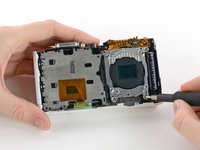
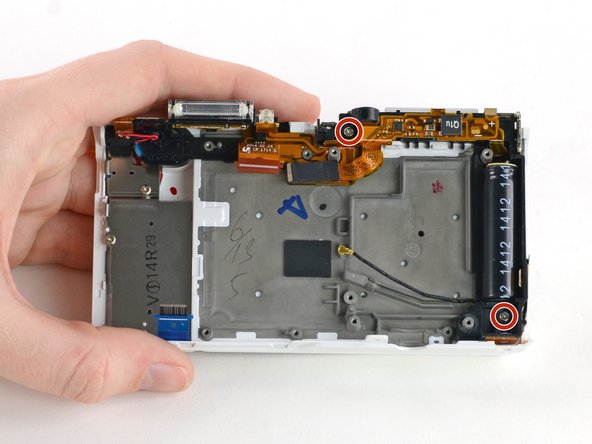
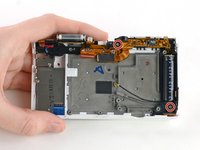
    • Use a Phillips #00 screwdriver to remove the two 5 mm screws holding the flash assembly to the camera case.

    Ask FixBot

    Add Comment

  16. Samsung NX Mini LCD Replacement: step 16, image 1 of 2 Samsung NX Mini LCD Replacement: step 16, image 2 of 2
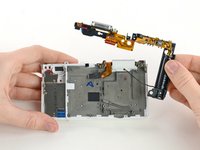
    • Remove the flash assembly by gently pulling it away from the case.

    • You may need to use a spudger to release some of the clips holding the assembly in place.

    • Avoid touching the ends of the capacitor (the large black cylinder on the right). Capacitors that haven't been discharged may cause electric shock. Learn how to discharge a capacitor here.

    Ask FixBot

    Add Comment

  17. Samsung NX Mini LCD Replacement, LCD: step 17, image 1 of 1
    • Remove the 5 mm Phillips #00 screw in the top right corner of the LCD assembly.

    Ask FixBot

    Add Comment

  18. Samsung NX Mini LCD Replacement: step 18, image 1 of 2 Samsung NX Mini LCD Replacement: step 18, image 2 of 2
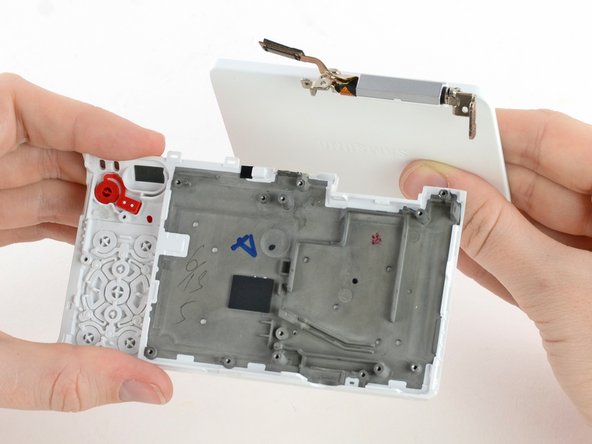
    • Tilt and wiggle the LCD to remove it from the case.

    Ask FixBot

    Add Comment

Conclusion

To reassemble your device, follow these instructions in reverse order.

Cancel: I did not complete this guide.

One other person completed this guide.

Kelsea Weber

Member since: 11/12/15

21,319 Reputation

32 Guides authored

0 Guide Comments

Add Comment

View Statistics:

Past 24 Hours: 1

Past 7 Days: 5

Past 30 Days: 30

All Time: 888