Samsung Moment Camera Button Replacement

Allison Coffee and 9 other contributors
Last updated on May 7, 2024
Views: 1.4K
View statistics:
- Past 24 Hours:
- 2
- Past 7 Days:
- 27
- Past 30 Days:
- 103
- All Time:
- 1,396
Comments: 0
No one has left comments on this guide. Will you be first?
Go to guide commentsCompleted: 3 4
3 people have marked this guide "completed." Will you be next?
4 people have marked this guide "completed." Including you — great job!
Favorites: 4 5
4 people have favorited (and subscribed to) this guide. Will you be next?
5 people have favorited (and subscribed to) this guide — including you!
Action Shots
Be an action hero! This guide needs images that better demonstrate how to perform specific actions.
Markup Mishap
This guide needs better markups. Help out by correcting or making some markup annotations.
Community-Contributed Guide
An awesome member of our community made this guide. It was not created by iFixit staff.
Missing Details
Some of this guide's details are missing. Help users by adding tools, difficulty, or time.
Introduction
Go to step 1 ↓This guide details how to install a new camera button on your Samsung Moment SPH M900. The camera button is located on the lower right side, distinguished by a black line. We provide directions for both disassembly and reassembly.
What you need


-
-
-
Power off the phone using the "Power Button", the circular middle button in the center of the phone.
-
Locate the camera button on bottom right side of your phone
-
Remove the back panel of the phone by sliding the spudger along the edge of the phone. The rear plastic panel will snap off from the remainder of the phone.
 Ask FixBot
-
-
-
-
If you have not already removed the memory card, remove it by gently sliding it out of its holder.
-
-
-
Using the small Phillips #000 screw driver, remove the six screws from the back of the phone.
-
Using the spudger tool, separate the back housing from the phone.
-
-
Tool used on this step:Tweezers$4.99
-
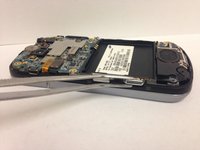
If the camera button did not fall, carefully remove it using a pair of tweezers. At this point, you can replace the button with a new one.
-
-



To reassemble your device, follow these instructions in reverse order.
Be sure to gently slide the memory card back in its holder.
Cancel: I did not complete this guide.
3 other people completed this guide.