Free Shipping on Domestic Orders $75+

Samsung Impression Keyboard Replacement

What you need

    1. Samsung Impression Keyboard Replacement, Battery: step 1, image 1 of 1
      • Orient the phone with the screen facing downward.

      • Slide the panel away from the camera using your thumb. This will expose the battery.

      Ask FixBot

      Add Comment

    2. Samsung Impression Keyboard Replacement: step 2, image 1 of 2 Samsung Impression Keyboard Replacement: step 2, image 2 of 2
      • Insert the tip of the spudger on the left side of the battery.

      • Pry the battery out. It will pivot in the direction of the white arrow.

      Ask FixBot

      Add Comment

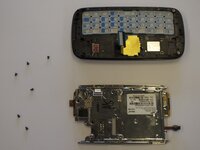
    1. Samsung Impression Keyboard Replacement, Back Cover: step 3, image 1 of 1
      • Remove the six 3.5 mm screws using a Phillips #000 screwdriver. Unscrew in a counterclockwise direction.

      Ask FixBot

      Add Comment

    2. Samsung Impression Keyboard Replacement: step 4, image 1 of 1
      • Gently pry around the edges with the spudger to remove back panel.

      • It may help to slide the touchscreen upwards when removing the back panel.

      • The side buttons will become loose and will fall out, so put these in a safe place.

      Ask FixBot

      Add Comment

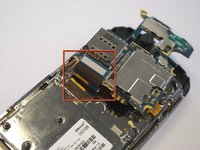
    1. Samsung Impression Keyboard Replacement, Circuit Board: step 5, image 1 of 1
      • Gently remove the black wire to free the circuit board.

      • Remove the wire by gently prying up the gold terminator attached to the green circuit board.

      Ask FixBot

      Add Comment

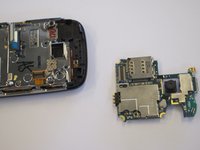
    2. Samsung Impression Keyboard Replacement: step 6, image 1 of 2 Samsung Impression Keyboard Replacement: step 6, image 2 of 2
      • Gently tug the black and blue ribbon upwards to release the circuit board.

      Ask FixBot

      Add Comment

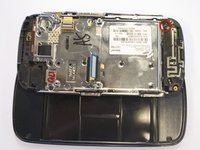
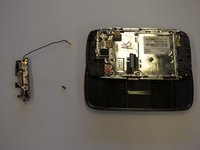
    1. Samsung Impression Keyboard Replacement, Antenna: step 7, image 1 of 2 Samsung Impression Keyboard Replacement, Antenna: step 7, image 2 of 2
      • Use a Phillips screwdriver to remove the six 3.5 mm screws by rotating.

      • The antenna assembly will snap off.

      Ask FixBot

      Add Comment

    1. Samsung Impression Keyboard Replacement, Keyboard: step 8, image 1 of 1
      • Remove the two base screws along the edge of the silver piece, where you just removed the black end piece.

      • The screws are 2.7mm in length.

      • The bottom black end cap will snap out.

      Ask FixBot

      Add Comment

    2. Samsung Impression Keyboard Replacement: step 9, image 1 of 2 Samsung Impression Keyboard Replacement: step 9, image 2 of 2
      • Remove the six 2.7 mm screws holding the silver plate on and set aside (fig. 1).

      • Separate the silver plate and phone frame (fig. 2).

      Ask FixBot

      Add Comment

    3. Samsung Impression Keyboard Replacement: step 10, image 1 of 1
      • The silver piece you are left with is the physical keyboard assembly.

      Ask FixBot

      Add Comment

Conclusion

To reassemble your device, follow these instructions in reverse order.

Cancel: I did not complete this guide.

Ross McKelvie

Member since: 04/18/11

196 Reputation

4 Guides authored

Team

Cal Poly, Team 8-10, Regan Spring 2011 Member of Cal Poly, Team 8-10, Regan Spring 2011

CPSU-REGAN-S11S8G10

4 Members

99 Guides authored

0 Guide Comments

Add Comment

View Statistics:

Past 24 Hours: 1

Past 7 Days: 4

Past 30 Days: 21

All Time: 2,709