
Samsung Gear VR USB Connector Replacement

Alfredo Aparicio and
Last updated on Jul 31, 2019
Views: 19K
View statistics:
- Past 24 Hours:
- 9
- Past 7 Days:
- 45
- Past 30 Days:
- 198
- All Time:
- 18,780
Comments: 6
1 comment on steps, 5 guide comments.
Go to guide commentsCompleted: 3 4
3 people have marked this guide "completed." Will you be next?
4 people have marked this guide "completed." Including you — great job!
Favorites: 0 1
No one has favorited (and subscribed to) this guide. Will you be the first?
1 person has favorited (and subscribed to) this guide — and that's you!
Introduction
Go to step 1 ↓The Samsung Gear VR supports Micro USB and USB-C ports. If your mobile device is unable to physically connect to the headset ensure that the adapter is the appropriate shape for your device's port. This guide will instruct you how to change which adapter is connected to the headset if needed.
-
-
-
-
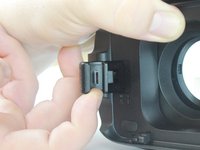
Lift connector clip away from headset and towards you.
-
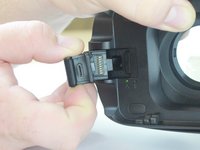
Slide current connector out and away from headset until it is disconnected from connector clip.
-
-
-
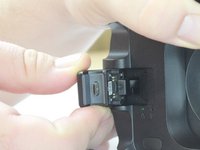
Select which connector fits the port of the device you wish to use with the Samsung Gear VR.
-
-
-
Slide the connector that connects to your device back onto the connector clip until you feel it settle into place.
-
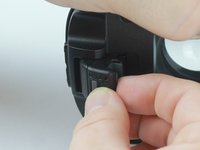
Slide the lock latch to the left to secure the connector into place.
-

 Ask FixBot




To reassemble your device, follow these instructions in reverse order.
Cancel: I did not complete this guide.
3 other people completed this guide.

Team

USF Tampa, Team S4-G6, Eyestone Fall 2017 Member of USF Tampa, Team S4-G6, Eyestone Fall 2017
USFT-EYESTONE-F17S4G6
4 Members
84 Guides authored
5 Guide Comments
Hola, quisiera saber donde se consigue esa parte, ni siquiera en samsung lo he logrado
Were do I get the USB c adapter
If you want USB c adapter I can give you…but we have to make exchange because I need micro usb adapter not type c
I have the micro USB adapter and need type c. Please advise as to how this barter may be executed?
Where can I get micro USB converter for gear vr not type c
