
Samsung Gear VR Focus Wheel Replacement

Alfredo Aparicio and
Last updated on May 31, 2018
Views: 2.4K
View statistics:
- Past 24 Hours:
- 2
- Past 7 Days:
- 17
- Past 30 Days:
- 82
- All Time:
- 2,398
Comments: 1
1 guide comment.
Go to guide commentsCompleted: 0 1
No one has marked this guide "completed." Will you be the first?
1 person has marked this guide "completed." It's you — great job!
Favorites: 0 1
No one has favorited (and subscribed to) this guide. Will you be the first?
1 person has favorited (and subscribed to) this guide — and that's you!
Featured Student Guide
This guide has been the hard work of our awesome students and is found to be exceptionally cool by the iFixit staff.
Introduction
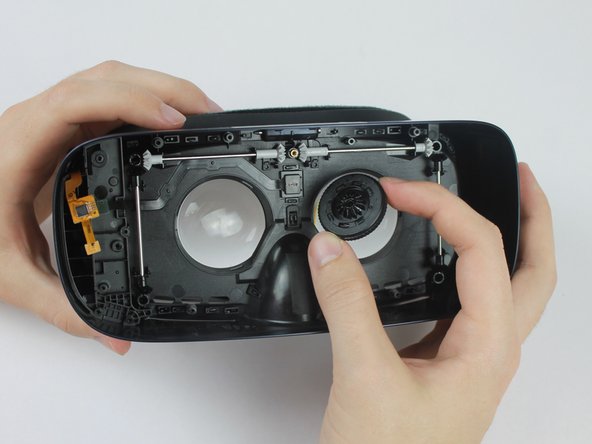
Go to step 1 ↓The Samsung Gear VR focuses on the connected mobile device by having the user rotate a wheel on top of the headset. This wheel rotates axles which in turn move the lenses closer or further away from the screen. If the wheel becomes difficult to turn it is possible that it has come off track and may need minor adjustment, or possible replacement. This guide contains the steps needed to access the lens focusing wheel for adjustment or replacement.
The motherboard partially sits on the inner mask piece of the headset and must be removed in order to remove the inner mask piece.
Caution is required while working on the headset as a wire harness connects the USB adapter to the motherboard. Care should be taken not to put any strain on the wire and to open the headset from right to left.
What you need
Parts
Tools


-
-
-
Remove the front cover to access a plate that holds the phone in place during use.
-
Remove the four corner screw covers with a metal spudger to reveal four screws.
-
Remove the sticker located at the top center to reveal two additional screws.
 Ask FixBot
-
-
-
Using the PH000 tip remove the six 0.5 cm screws that secure the front phone mount.
-
After the six 0.5 cm screws are completely removed lift the front phone mount up and to the left.
-
-
-
-
-
-
Use the blue plastic opening tool to remove the rest of the the pop connectors from the motherboard.
-
-
-
-
-
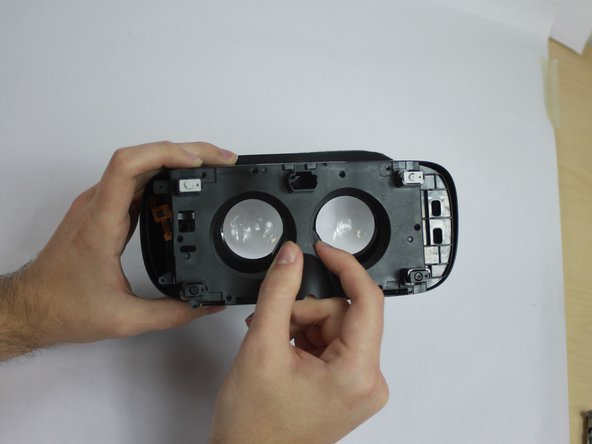
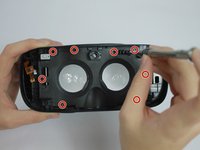
Using the PH000 tip remove the eight 0.5 cm screws from the Inner Mask
-
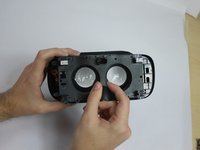
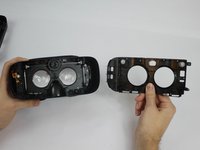
Carefully remove the Inner Mask by pulling it from the inner side of the lenses socket.
-
-
-




To reassemble your device, follow these instructions in reverse order.

Team

USF Tampa, Team S4-G6, Eyestone Fall 2017 Member of USF Tampa, Team S4-G6, Eyestone Fall 2017
USFT-EYESTONE-F17S4G6
4 Members
84 Guides authored
1 Guide Comment
hi Alfredo, so my VR Oculus is blurry, I was wondering if u probably new what the problem was and if u could help me. I see u contributed to fixing some issues on the product.
