Free Shipping on Domestic Orders $75+

Samsung Galaxy S4 Active I537 Charging port Replacement

What you need

    1. Samsung Galaxy S4 Active I537 Charging port Replacement, Rear Cover: step 1, image 1 of 2 Samsung Galaxy S4 Active I537 Charging port Replacement, Rear Cover: step 1, image 2 of 2
      • Remove back cover

      • Remove battery

      Ask FixBot

      Add Comment

    2. Samsung Galaxy S4 Active I537 Charging port Replacement, remove screws: step 2, image 1 of 1
      • remove battery before taking off screws

      • remove the 8 screws in the back using a small Phillips screw driver

      Ask FixBot

      Add Comment

    3. Samsung Galaxy S4 Active I537 Charging port Replacement, Covers: step 3, image 1 of 1
      • using a prying tool or something remove the 4 covers that are blocking the last 4 screws

      • you might have to put a bit of pressure to get them off

      Ask FixBot

      Add Comment

    4. Samsung Galaxy S4 Active I537 Charging port Replacement, More screws: step 4, image 1 of 2 Samsung Galaxy S4 Active I537 Charging port Replacement, More screws: step 4, image 2 of 2
      • Remove the 4 screws

      • with a prying tool or fingers go around the edges to remove the plastic back part of the phone

      • be carefull not to break it by using too much force

      Ask FixBot

      Add Comment

    5. Samsung Galaxy S4 Active I537 Charging port Replacement, Screws: step 5, image 1 of 1
      • Remove these 2 screws then take off the white plastic part

      Ask FixBot

      Add Comment

    6. Samsung Galaxy S4 Active I537 Charging port Replacement, Antenna cable: step 6, image 1 of 1
      • use prying tool or finger to unplug antenna cable

      • be extra careful unplugging this

      Ask FixBot

      Add Comment

    7. Samsung Galaxy S4 Active I537 Charging port Replacement: step 7, image 1 of 1
      • use prying tool or fingers to unplug this connection

      • again be careful

      Ask FixBot

      Add Comment

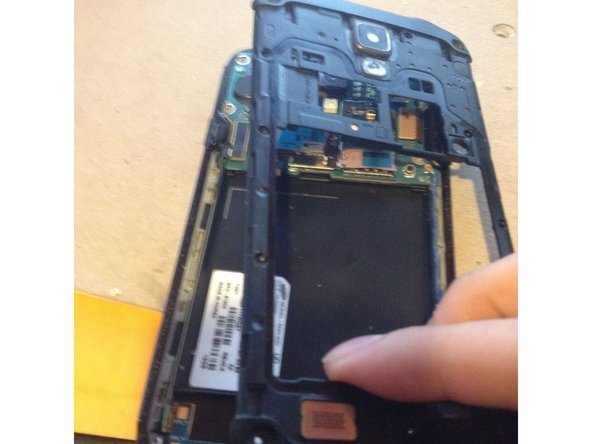
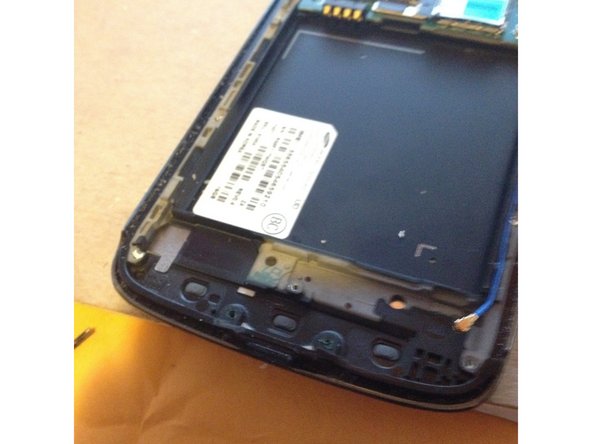
    8. Samsung Galaxy S4 Active I537 Charging port Replacement: step 8, image 1 of 2 Samsung Galaxy S4 Active I537 Charging port Replacement: step 8, image 2 of 2
      • you can now use the prying tool or fingers to remove the charging port and replace it with the new one

      • follow steps in reverse to resemble

      • carefully

      Ask FixBot

      Add Comment

Conclusion

To reassemble your device, follow these instructions in reverse order.

Cancel: I did not complete this guide.

17 other people completed this guide.

ted582 ted583

Member since: 07/01/15

553 Reputation

1 Guide authored

3 Guide Comments

Good tear down procedure.

tcjd1976 - Reply Share

I replaced Charging Port on my Samsung SGH-i537 about a week ago (Before I found this “Tear-Down Procedure”.)! You did a nice job putting this information together!

It’s relatively simple, although sometimes I feel like “the more information the better”!

I DO HAVE A QUESTION: After I removed the screws, and separated the two halves of my phone, I turned the front half face-up, and a small, flat, black clip I didn’t notice, fell from SOMEWHERE! Despite my looking for many various possibilities as to where this clip goes back into my phone, I didn't find a place that it would fit properly. I’m sure it’s location is staring me in the face, but I’m still not finding it!

After a whole lot more looking, one square centimeter at a time, I reluctantly decided to put my phone back together without this “clip”.

The phone works great! But I know this “clip” was in it for a reason, so I’m having a hard time calling this repair a complete success!

Does anybody know exactly where this “clip” goes?

Thanks!

Roger.

Roger C. Smith - Reply Share

I think it holds the midframe in. No worries, my midframe stays in with 3 screws.

[deleted] - Reply Share

Add Comment

View Statistics:

Past 24 Hours: 4

Past 7 Days: 14

Past 30 Days: 40

All Time: 8,534