
Samsung Galaxy Note Pro 12.2 USB Port Replacement

Tina Kong and
Last updated on Oct 29, 2018
Views: 5.2K
View statistics:
- Past 24 Hours:
- 6
- Past 7 Days:
- 27
- Past 30 Days:
- 92
- All Time:
- 5,177
Comments: 7
2 comments on steps, 5 guide comments.
Go to guide commentsCompleted: 6 7
6 people have marked this guide "completed." Will you be next?
7 people have marked this guide "completed." Including you — great job!
Favorites: 2 3
2 people have favorited (and subscribed to) this guide. Will you be next?
3 people have favorited (and subscribed to) this guide — including you!
Introduction
Go to step 1 ↓If your device is unable to charge you may need to replace your USB port. This guide will show you how to replace the USB port in your Device.
What you need
Parts

Tools


-
-
-
-
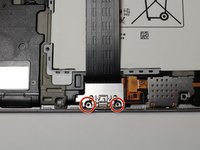
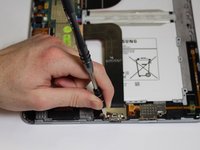
Remove the two 3mm screws from the silver cover using the Phillips #00 screwdriver.
-
-
-
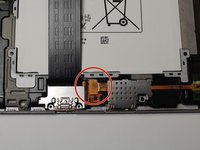
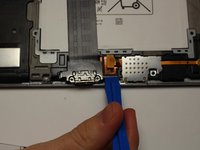
Pop open the orange tab that is connected to the SD port using the plastic opening tool.
-
-
-
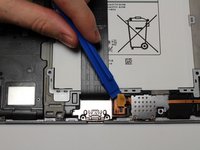
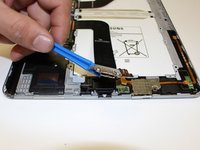
Using the plastic opening tool, carefully lift away the orange piece connected to the USB port.
-

 Ask FixBot






To reassemble your device, follow these instructions in reverse order.
Cancel: I did not complete this guide.
6 other people completed this guide.

Team

Central Washington University, Team S1-G4, Pengilly Fall 2017 Member of Central Washington University, Team S1-G4, Pengilly Fall 2017
CWU-PENGILLY-F17S1G4
4 Members
60 Guides authored
5 Guide Comments
I have a problem with my note pro 12.2 wifi. The battery connector is broken and needs to be replaced on the motherboard. I want to do it right but can find No information online about removing the motherboard (I have found one that is very good for the 10.1) but there are cables on the 12.2 not on the 10.1 that I am not sure how to remove them.
How about a battery connector replacement for the note pro 12.2 SM-P900 on motherboard.
Great instruction set and photos. I was a little nervous cracking it open for the first time (not as bad as the first time I upgraded my PC, but close), but your pictures and instructions were aces! It would have gone easier if I’d realized earlier that clicking on the photos popped them out to a separate tab where I could zoom, but I figured that out soon enough. The general concensus on the opener tools are that they don’t last long. I’d have to agree with that. Mine took a beating trying to get the back off, but with your instructions, it’s fixed. Thanks!
I lost the two screws. What size are they and where can I purchase them? Thank you.
very good instructions, was very helpful.
But it's still makes trouble charging.
Can it be any other problem or reason? Something doing the opposite of loading, very frustrating.
