
Samsung Galaxy Note Pro 12.2 Motherboard Replacement

La'Taja Long and 6 other contributors
Last updated on May 7, 2024
Views: 3.1K
View statistics:
- Past 24 Hours:
- 2
- Past 7 Days:
- 19
- Past 30 Days:
- 80
- All Time:
- 3,084
Comments: 4
3 comments on steps, 1 guide comment.
Go to guide commentsCompleted: 3 4
3 people have marked this guide "completed." Will you be next?
4 people have marked this guide "completed." Including you — great job!
Favorites: 1 2
1 person has favorited (and subscribed to) this guide. Will you be next?
2 people have favorited (and subscribed to) this guide — including you!
Introduction
Go to step 1 ↓Replacing the motherboard of your Samsung Galaxy Note Pro 12.2 (Galaxy SM-P900) device can provide faster RAM, faster data transfer, for increased performance.
The motherboard is responsible for power and communication between all of your hardware components delicately connected to it on your tablet device. This is why many hardware components need to be removed from the device before removing the motherboard. Steps 1-5 will walk you through the removal of those components.
Lastly, be sure that your device is powered off before beginning the disassembly process.
What you need
Parts

Tools


-
-
-
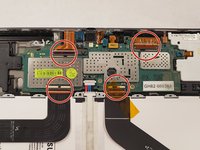
Disconnect the five base connectors from the motherboard by using the blue opening tool to carefully remove the connectors.
-
-
-
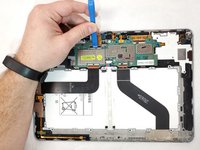
Using the blue opening tool, pry on the black tab at the base connector of ribbon cables until it is flipped up and moves with ease. Then, pull the ribbon cable from the base connectors of the motherboard.
-
-
Tool used on this step:Tweezers$4.99
-
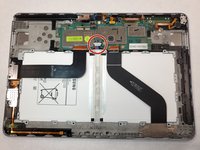
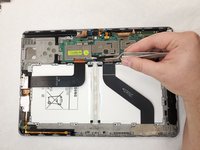
Remove the power cable from the motherboard by prying slightly on both sides of the clip using tweezers.
-
-
-
-
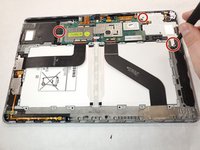
Remove all three of the 3.0 mm screws using the Phillips #00 screwdriver.
-
Use the blue plastic opening tool to pry the speakers up from the clips that hold them in place.
-
-
-
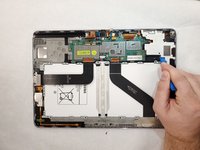
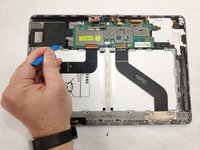
Remove the motherboard using the blue opening tool while keeping any wires and connectors out of the way.
-

 Ask FixBot







To reassemble your device, follow these instructions in reverse order.
Cancel: I did not complete this guide.
3 other people completed this guide.

Team

IUPUI, Team S1-G3, Henning Fall 2019 Member of IUPUI, Team S1-G3, Henning Fall 2019
IUPUI-HENNING-F19S1G3
3 Members
36 Guides authored
