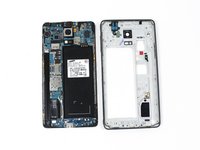
Shop the Holiday Gift Guide
Free Shipping on Domestic Orders $75+

Samsung Galaxy Note 4 Volume Buttons Replacement

Views: 17K

View statistics:

Past 24 Hours:
1
Past 7 Days:
28
Past 30 Days:
107
All Time:
17,395
Comments: 18

16 comments on steps, 2 guide comments.

Go to guide comments
Completed: 18

18 people have marked this guide "completed." Will you be next?

Favorites: 13

13 people have favorited (and subscribed to) this guide. Will you be next?

Time Required: 25 - 35 minutes
Difficulty: Moderate
Samsung Galaxy Note 4 Volume Buttons Replacement

Introduction

Go to step 1 ↓

Use this guide to replace the volume buttons on your Samsung Galaxy Note 4.

What you need

Tools

    1. Samsung Galaxy Note 4 Volume Buttons Replacement, Rear Case: step 1, image 1 of 2 Samsung Galaxy Note 4 Volume Buttons Replacement, Rear Case: step 1, image 2 of 2
      • Insert a fingernail or plastic opening tool into the divot to the left of the rear-facing camera.

      • Gently pry and twist the flexible rear cover off the back of the phone.

      Ask FixBot

      Add Comment

    1. Samsung Galaxy Note 4 Volume Buttons Replacement, Battery: step 2, image 1 of 1
      • Insert a fingernail or plastic opening tool into the recess in the bottom right corner of the battery and lift upward.

      • Remove the battery.

      Ask FixBot

      Add Comment

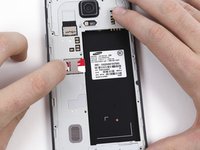
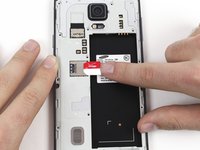
    1. Samsung Galaxy Note 4 Volume Buttons Replacement, SIM Card: step 3, image 1 of 2 Samsung Galaxy Note 4 Volume Buttons Replacement, SIM Card: step 3, image 2 of 2
      • Remove the SIM card by first pushing the card slightly out of its housing, then pulling it the rest of the way.

      Ask FixBot

      Add Comment

    1. Samsung Galaxy Note 4 Volume Buttons Replacement, Midframe: step 4, image 1 of 1
      • Remove the sixteen 4.0 mm Phillips #00 screws securing the midframe to the display assembly.

      • Grasp the cap of the S Pen and remove it from its slot in the midframe.

      Ask FixBot

      Add Comment

    2. Samsung Galaxy Note 4 Volume Buttons Replacement: step 5, image 1 of 3 Samsung Galaxy Note 4 Volume Buttons Replacement: step 5, image 2 of 3 Samsung Galaxy Note 4 Volume Buttons Replacement: step 5, image 3 of 3
      • Insert a plastic opening tool between the midframe and the display assembly.

      • Work the plastic opening tool around the perimeter of the phone to break the adhesive.

      • This adhesive is relatively weak, so no heat gun should be necessary.

      • Be careful to not separate the front glass panel from the rest of the display assembly, as it is still held together with adhesive.

      Ask FixBot

      Add Comment

    3. Samsung Galaxy Note 4 Volume Buttons Replacement: step 6, image 1 of 1
      • Use a plastic opening tool to loosen the clasps around the battery housing.

      Ask FixBot

      Add Comment

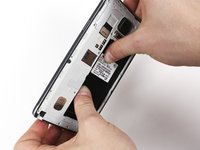
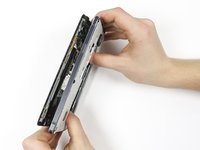
    4. Samsung Galaxy Note 4 Volume Buttons Replacement: step 7, image 1 of 3 Samsung Galaxy Note 4 Volume Buttons Replacement: step 7, image 2 of 3 Samsung Galaxy Note 4 Volume Buttons Replacement: step 7, image 3 of 3
      • Push on the battery housing to separate the midframe from the display assembly.

      • You will have to apply a reasonable amount of pressure to separate the two parts.

      • If your new midframe does not come with a headphone jack assembly, you'll need to transfer the one from the old midframe into the new one. It can be pried loose with plastic opening tools, as it is held in place with several plastic pins.

      Ask FixBot

      Add Comment

    1. Samsung Galaxy Note 4 Volume Buttons Replacement, Volume Buttons: step 8, image 1 of 2 Samsung Galaxy Note 4 Volume Buttons Replacement, Volume Buttons: step 8, image 2 of 2
      Tool used on this step:
      Tweezers
      $4.99
      Buy
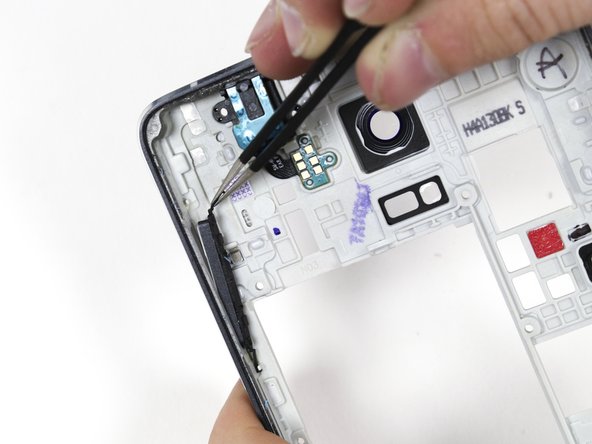
      • Use a set of tweezers to free the volume buttons from the midframe.

      Ask FixBot

      Add Comment

Conclusion

To reassemble your device, follow these instructions in reverse order.

Cancel: I did not complete this guide.

18 other people completed this guide.

Author

with

Derek Nola

Member since: 01/06/15

2,295 Reputation

5 Guides authored

Team

Cal Poly, Team 70-6, Forte Winter 2015 Member of Cal Poly, Team 70-6, Forte Winter 2015

CPSU-FORTE-W15S70G6

4 Members

72 Guides authored

2 Guide Comments

I remember wwwdrcelluar.comĀ  its gone,. Apple must have shut them down in law suit. How the !&&* do I do now?

savecityofheroes1 - Reply Share

I remember Drcellular*com that was the place where I buy my parts from. there are goneĀ  Apple must have shut down another 3rd party repair on law suits now how the H E L L do I do now?

savecityofheroes1 - Reply Share

Add Comment

View Statistics:

Past 24 Hours: 1

Past 7 Days: 28

Past 30 Days: 107

All Time: 17,395