Free Shipping on Domestic Orders $75+

Samsung Galaxy J3 Emerge Home Button and Audio Jack Replacement

What you need

  1. Samsung Galaxy J3 Emerge Home Button and Audio Jack Replacement, Screen: step 1, image 1 of 3 Samsung Galaxy J3 Emerge Home Button and Audio Jack Replacement, Screen: step 1, image 2 of 3 Samsung Galaxy J3 Emerge Home Button and Audio Jack Replacement, Screen: step 1, image 3 of 3
    • Heat up the edges of the screen with a hair dryer.

    • Put the iFixit Opening Tool between the screen and body to open the edge of the screen up.

    • Work the iFixit Opening Tools around the whole screen to break the glue.

    Ask FixBot

    Add Comment

  2. Samsung Galaxy J3 Emerge Home Button and Audio Jack Replacement: step 2, image 1 of 2 Samsung Galaxy J3 Emerge Home Button and Audio Jack Replacement: step 2, image 2 of 2
    • Lift the screen up from the bottom.

    • The screen could crack when lifting it up.

    • Pry the gray cover open.

    Ask FixBot

    Add Comment

  3. Samsung Galaxy J3 Emerge Home Button and Audio Jack Replacement: step 3, image 1 of 2 Samsung Galaxy J3 Emerge Home Button and Audio Jack Replacement: step 3, image 2 of 2
    • Pry the connector off of the motherboard by using a clean nail or the iFixit opening tool.

    Ask FixBot

    Add Comment

  4. Samsung Galaxy J3 Emerge Home Button and Audio Jack Replacement, Motherboard: step 4, image 1 of 2 Samsung Galaxy J3 Emerge Home Button and Audio Jack Replacement, Motherboard: step 4, image 2 of 2
    • Remove the eleven Phillips #00 3.5mm screws.

    • If the screws get stuck when removing, try using tape to get them out. Place the adhesive side of tape on the screws and pull the tape off the spot.

    Ask FixBot

    Add Comment

  5. Samsung Galaxy J3 Emerge Home Button and Audio Jack Replacement: step 5, image 1 of 1
    • Turn the phone over and push down where the battery was.

    • There will be a loud clicking noise when applying pressure.

    Ask FixBot

    Add Comment

  6. Samsung Galaxy J3 Emerge Home Button and Audio Jack Replacement: step 6, image 1 of 1
    • Insert the iFixit Opening Pick between the motherboard and the panel.

    • Work the iFixit Opening Pick around the outside of the motherboard.

    Ask FixBot

    Add Comment

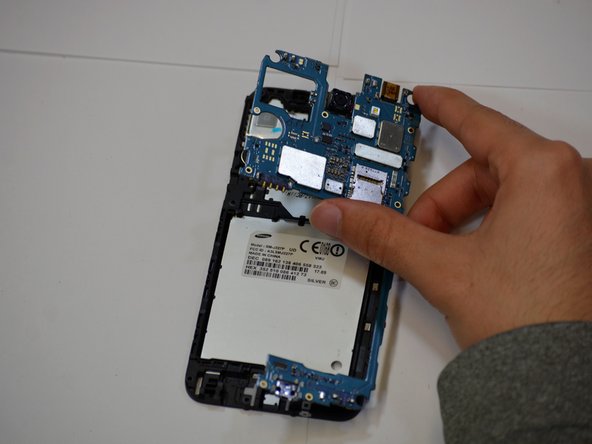
  7. Samsung Galaxy J3 Emerge Home Button and Audio Jack Replacement: step 7, image 1 of 2 Samsung Galaxy J3 Emerge Home Button and Audio Jack Replacement: step 7, image 2 of 2
    • Pry the motherboard away from the phone using your hand.

    Ask FixBot

    Add Comment

  8. Samsung Galaxy J3 Emerge Home Button and Audio Jack Replacement, Home Button and Audio Jack: step 8, image 1 of 1
    • Slide the home button to the left to pop it off.

    Ask FixBot

    Add Comment

  9. Samsung Galaxy J3 Emerge Home Button and Audio Jack Replacement: step 9, image 1 of 1
    • Remove the connector where the home button was using the iFixit Opening Pick.

    Ask FixBot

    Add Comment

  10. Samsung Galaxy J3 Emerge Home Button and Audio Jack Replacement: step 10, image 1 of 1
    • Lift up the connector and push it through the motherboard by following the ribbon.

    Ask FixBot

    Add Comment

  11. Samsung Galaxy J3 Emerge Home Button and Audio Jack Replacement: step 11, image 1 of 2 Samsung Galaxy J3 Emerge Home Button and Audio Jack Replacement: step 11, image 2 of 2
    • Follow the ribbon and gently pop the audio port out using the iFixit Opening Pick.

    Ask FixBot

    Add Comment

Conclusion

To reassemble your device, follow these instructions in reverse order.

Cancel: I did not complete this guide.

2 other people completed this guide.

Hugh Cosculluela

Member since: 01/24/19

531 Reputation

4 Guides authored

Team

Cal Poly, Team S19-G2, White Winter 2019 Member of Cal Poly, Team S19-G2, White Winter 2019

CPSU-WHITE-W19S19G2

4 Members

5 Guides authored

0 Guide Comments

Add Comment

View Statistics:

Past 24 Hours: 2

Past 7 Days: 7

Past 30 Days: 37

All Time: 1,958