Introduction
This is a full screen replacement of the A22/A22 5g please be careful with the disassembly and assembly of the device as it has fragile components
What you need
-
-
Firstly remove the Sim card .
-
start heating the back of the phone all around the edges of the back with an iOpener or aheat gun
-
start moving your pry card start around the edges of the phone to remove the adhesive it will take some time be patient and do it with care
-
mind the 2 cables in the middle of the phone don't damage them
-
-
-
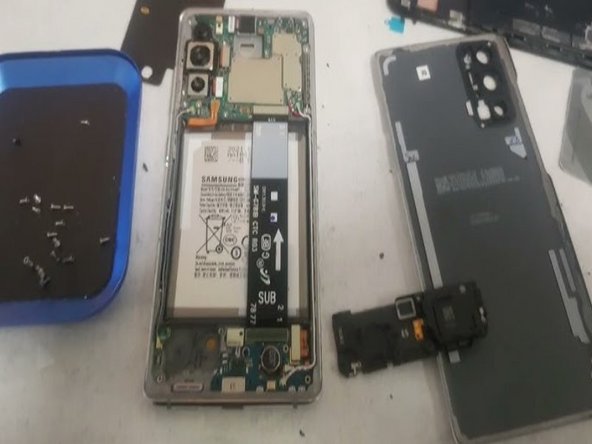
When you open the back start taking of the screws of the top of the phone and bottom of the frame
-
Then with a pry card remove the inner plastic frame of the phone carefully go all around the phone to take off the frame
-
You should remove the wire connected from the frame to the phone
-
-
-
-
Remove the three ribbon cables for the screen and battery
-
Remove the speaker cover this will show the ribbon cable you will remove which is connected to the screen
-
-
-
Next remove your old screen with a iOpener or a heat gun and a pry cart go all round the edges to take of the old display
-
make sure you go all around the edges clean left out adhesive and make sure the front is properly clean
-
Place the ribbon cable inside the gap of the frame and assemble it
-
Place your new adhesive around the frame of the phone place your new screen on top of the frame
-
-
-
closed it up and use Clamp holders to press around the whole screen of the phone make sure it sticks in place
-
Then turn the phone around place the all the ribbon cables back in place make sure your new screen works
-
close the back cover with new adhesive use clamp Holders to help you completely seal it up
-
If you don't have clamp holders you can use ruber bands
-




To reassemble your device, follow these instructions in reverse order.
To reassemble your device, follow these instructions in reverse order.
Cancel: I did not complete this guide.
5 other people completed this guide.


3 Comments
Thanks for the help
It is not Galaxy A22 5G device on the pics.
Adhesive missing in “Needed parts”
