
Samsung Admire Camera Replacement

Thao Uyen Do and 5 other contributors
Last updated on Mar 7, 2024
Views: 2.4K
View statistics:
- Past 24 Hours:
- 2
- Past 7 Days:
- 25
- Past 30 Days:
- 101
- All Time:
- 2,378
Comments: 0
No one has left comments on this guide. Will you be first?
Go to guide commentsCompleted: 12 13
12 people have marked this guide "completed." Will you be next?
13 people have marked this guide "completed." Including you — great job!
Favorites: 2 3
2 people have favorited (and subscribed to) this guide. Will you be next?
3 people have favorited (and subscribed to) this guide — including you!
Introduction
Go to step 1 ↓This guide shows you how to replace the camera on your phone.
What you need
Tools


-
-
-
Use your fingernail or the plastic opening tool under the slit to pull the back cover off.
 Ask FixBot
-
-
-
Making sure your hands are dry, insert your fingernail beneath the battery and remove it.
-
-
-
Tool used on this step:Magnetic Project Mat$19.95
-
Use a Phillips #00 Precision Screwdriver to remove the six screws in the back of the phone.
-
Place the screws on a magnetic mat to prevent losing them.
-
-
-
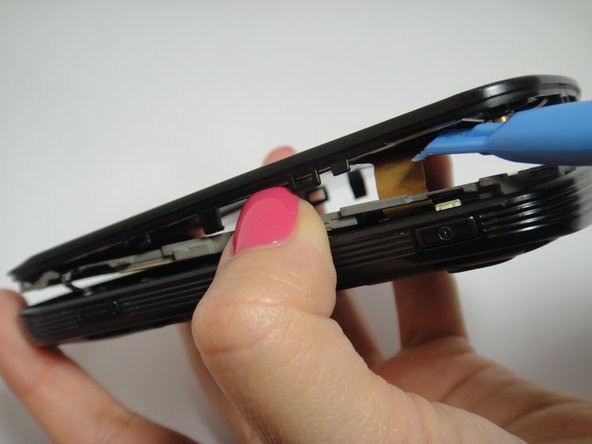
Place the Plastic Opening tool on the outside rim of the back cover.
-
Carefully circle around the rim to open the inside back cover completely.
-
Disconnect the ribbon cables and remove the back cover.
-
-
-
Carefully disconnect the volume button, the microphone connector, and the screen connector from the motherboard.
-
Pull back the side clips and lift the motherboard slowly.
-
-
-
Use the plastic opening tool to disconnect the camera from the phone.
-
Connect the new camera into the motherboard.
-
-




To reassemble your device, follow these instructions in reverse order.
Cancel: I did not complete this guide.
12 other people completed this guide.

Team

USF Tampa, Team 7-5, Remmell Winter 2015 Member of USF Tampa, Team 7-5, Remmell Winter 2015
USFT-REMMELL-W15S7G5
4 Members
48 Guides authored
