Introduction
The guide covers how to gain access to and replace the battery pack within a SAFLOK Quantum door lock series as well as discussing the steps needed to be taken to avoid further malfunctions. It is compulsory to inspect the battery pack every six months for wear and condition.
To prevent lock outs, it is recommended to replace the battery pack after a full years use.
This guide specifically covers the SAFLOK Quantum IV model.
What you need
Featured Document
-
-
If red, the lock is operating correctly, however the key-card/ fob is not programmed to access the lock.
-
If yellow, the lock is functioning, however the deadbolt is currently engaged
-
If the RF-ID does not respond in any way to the key-card / fob, then the battery needs to be replaced. Proceed to step two.
-
-
-
Use a SAFLOK Battery Backup Jumper to power the lock by inserting the USB 2.0 mini-B plug into the port located on the bottom left of the reader.
-
If the RF-ID does not respond to the SAFLOK Battery Backup Jumper, check to insure it is inserted correctly into the RF-ID reader. Check the power supply within the SAFLOK Battery Backup Jumper.
-
Open the door by using a properly programmed card key or fob to gain access to the room. Use a doorstop to secure the door in an open position. Remove the SAFLOK Battery Backup Jumper to preserve its battery.
-
-
-
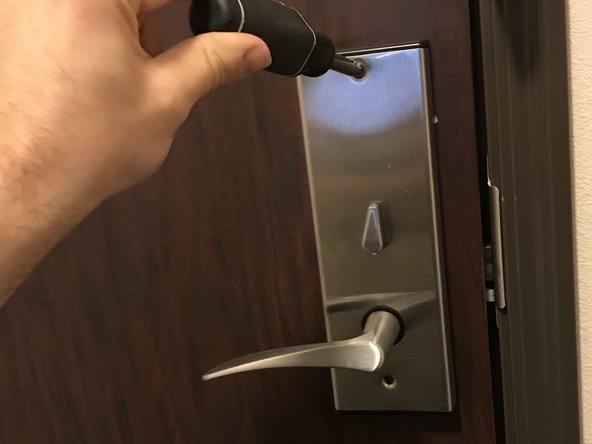
Use a T15 Security Torx Screwdriver to remove two screws located at the top and bottom of the face-plate.
-
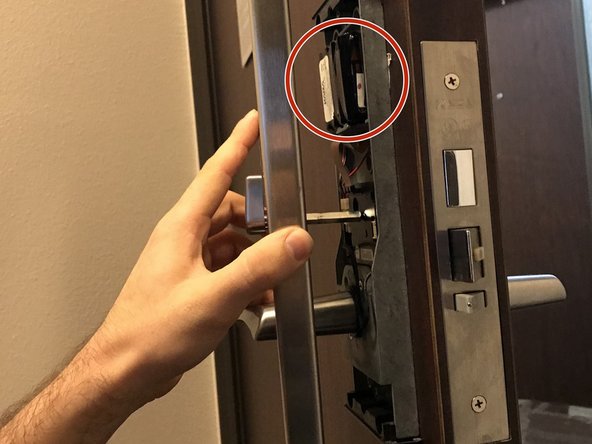
Remove the face-plate by slipping it back and away from the SAFLOK mechanism.
-
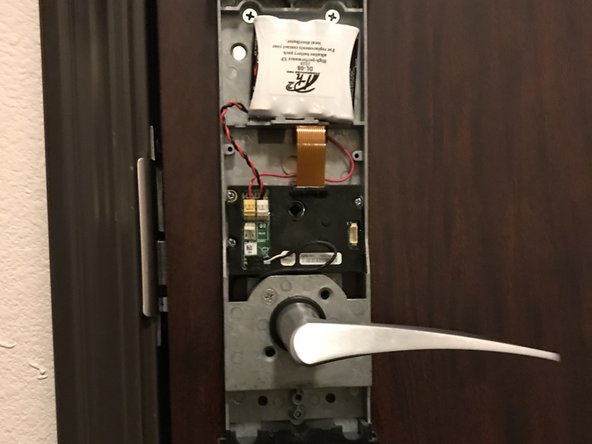
Be aware that removing the face-plate may cause the old battery to fall from its cradle, damaging the pins of the circuit board. The battery can be located at the top half of the internal mechanism. It is recommended to use a free hand to hold the battery in place during the removal of the face-plate.
-
-
-
-
This is the battery pack resting upon its cradle within the internal mechanism. This battery is the one that will be replaced within this guide.
-
This plug connects the external RFID reader to the locking mechanism. Make sure not to pull this plug or dislodge it during the removal of the battery or the locking mechanism will not function.
-





To reassemble your device, Replace the rear cover and ensure the lock is functional before closing the door.
Cancel: I did not complete this guide.
One other person completed this guide.
Attached Documents



Team

Casper College, Team 1-4, Lareau Fall 2021 Member of Casper College, Team 1-4, Lareau Fall 2021
CASC-LAREAU-F21S1G4
2 Members
1 Guide authored
