Free Shipping on Domestic Orders $75+

This translation was generated by a machine and has not been reviewed by a person yet. Speak this language? Review it.

Rockbox Slice - Replacement battery replacement

    1. Rockbox Slice - Replacement battery replacement, Full view: step 1, image 1 of 3 Rockbox Slice - Replacement battery replacement, Full view: step 1, image 2 of 3 Rockbox Slice - Replacement battery replacement, Full view: step 1, image 3 of 3
      • The box with the controls, inputs, and outputs.

      Ask FixBot

      Add Comment

    2. Rockbox Slice - Replacement battery replacement, Prying off the cover: step 2, image 1 of 2 Rockbox Slice - Replacement battery replacement, Prying off the cover: step 2, image 2 of 2
      • The fabric is glued onto a plastic panel. Unfortunately, this panel is glued onto the underlying component.

      • Carefully pry off the fabric panel all the way around using a narrow screwdriver. Depending on the amount of glue used, this may be easier or harder.

      • Unfortunately, a few pins will break off in the process. However, this should not affect the stability. It is possible, however, that the sound quality may suffer.

      Ask FixBot

      Add Comment

    3. Rockbox Slice - Replacement battery replacement, Removing the speaker bracket: step 3, image 1 of 3 Rockbox Slice - Replacement battery replacement, Removing the speaker bracket: step 3, image 2 of 3 Rockbox Slice - Replacement battery replacement, Removing the speaker bracket: step 3, image 3 of 3
      • Remove the 7 screws.

      • The pins broke off during removal.

      • Lithium-ion replacement battery, CLICL18500, 3.7 V, 1400 mAh

      • The replacement battery must be desoldered to be replaced.

      Ask FixBot

      Add Comment

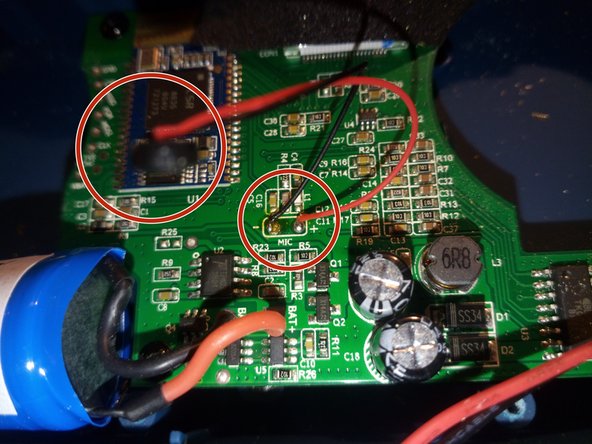
    4. Rockbox Slice - Replacement battery replacement, Microphone: step 4, image 1 of 1
      • I also noticed that a microphone is built-in. When the Rockbox is connected to a phone, you can also answer calls. It then functions as a speakerphone.

      Ask FixBot

      Add Comment

Conclusion

Follow these steps in reverse order to reassemble your device.

Cancel: I did not complete this guide.

Andreas Reheis

Member since: 03/19/17

4,158 Reputation

27 Guides authored

Team

DerToaster Member of DerToaster

Local Repair Groups

6 Members

420 Guides authored

0 Guide Comments

Add Comment

View Statistics:

Past 24 Hours: 1

Past 7 Days: 14

Past 30 Days: 78

All Time: 484