Free Shipping on Domestic Orders $75+

Ring Video Doorbell Motherboard Replacement

Views: 5.5K

View statistics:

Past 24 Hours:
1
Past 7 Days:
17
Past 30 Days:
88
All Time:
5,534
Comments: 1

1 guide comment.

Go to guide comments
Completed: 5

5 people have marked this guide "completed." Will you be next?

Favorites: 0

No one has favorited (and subscribed to) this guide. Will you be the first?

Time Required: 15 - 20 minutes
Difficulty: Moderate
Ring Video Doorbell Motherboard Replacement

Introduction

Go to step 1 ↓

In this guide, you will be shown how to take apart and replace the Motherboard of the Ring Video Doorbell step-by-step. You will need a Phillips screwdriver size PH00 and a Plastic Tool Opener.

What you need

Tools

    1. Ring Video Doorbell Motherboard Replacement, Motherboard: step 1, image 1 of 3 Ring Video Doorbell Motherboard Replacement, Motherboard: step 1, image 2 of 3 Ring Video Doorbell Motherboard Replacement, Motherboard: step 1, image 3 of 3
      • Start by using the PH00 Phillips Screwdriver to take out the 6 1 mm screw's on the bottom of the device.

      • Pry open the aluminium plate using the Plastic Opening Tool(s).

      • Remove the 2 1 mm screws using the PH00 Phillips Screwdriver.

      Ask FixBot

      Add Comment

    2. Ring Video Doorbell Motherboard Replacement: step 2, image 1 of 3 Ring Video Doorbell Motherboard Replacement: step 2, image 2 of 3 Ring Video Doorbell Motherboard Replacement: step 2, image 3 of 3
      • Pry open the back case as shown using the Plastic Opening Tool.

      • Disconnect the battery from motherboard by carefully pulling up on the connector.

      Ask FixBot

      Add Comment

    3. Ring Video Doorbell Motherboard Replacement: step 3, image 1 of 3 Ring Video Doorbell Motherboard Replacement: step 3, image 2 of 3 Ring Video Doorbell Motherboard Replacement: step 3, image 3 of 3
      • Unscrew the 9 1 mm screwdrivers using a PH00 Phillips Screwdriver.

      • Carefully detach the motherboard, from the housing unit using your hands.

      Ask FixBot

      Add Comment

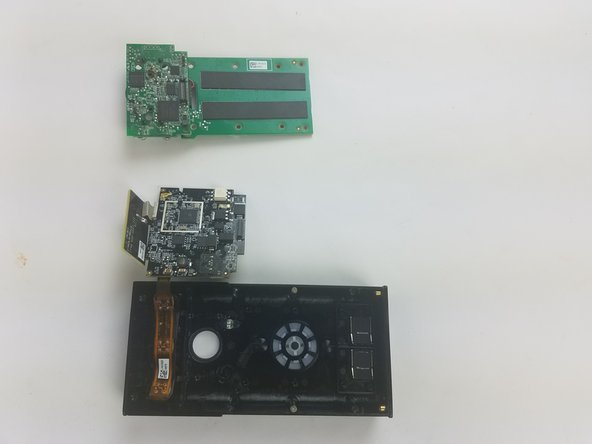
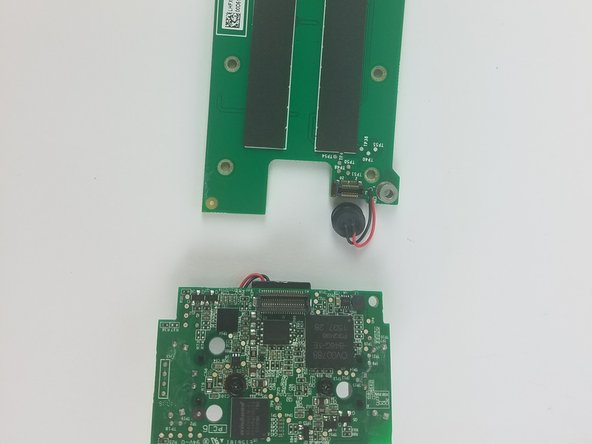
    4. Ring Video Doorbell Motherboard Replacement: step 4, image 1 of 2 Ring Video Doorbell Motherboard Replacement: step 4, image 2 of 2
      • Detach the upper part of the motherboard from the bottom, using your hands.

      Ask FixBot

      Add Comment

Conclusion

To reassemble your device, follow these instructions in reverse order.

Cancel: I did not complete this guide.

5 other people completed this guide.

Abdulrahman

Member since: 02/20/18

709 Reputation

3 Guides authored

Team

USF Tampa, Team S11-G5, Cheng Spring 2018 Member of USF Tampa, Team S11-G5, Cheng Spring 2018

USFT-CHENG-S18S11G5

3 Members

60 Guides authored

1 Guide Comment

Where can you buy a replacement motherboard?

Barry Specter - Reply Share

Add Comment

View Statistics:

Past 24 Hours: 1

Past 7 Days: 17

Past 30 Days: 88

All Time: 5,534