Free Shipping on Domestic Orders $75+

Right Microphone Installation

Prerequisite Only
This is a prerequisite-only guide! This guide is part of another procedure and isn’t meant to be used alone.

What you need

    1. Right Microphone Installation, Replace the old microphone adhesive: step 1, image 1 of 2 Right Microphone Installation, Replace the old microphone adhesive: step 1, image 2 of 2
      • Only follow this step if your replacement microphone has adhesive pre-installed, or if you can't reuse the old adhesive.

      • Use tweezers to remove all the old microphone adhesive.

      • If you're replacing the adhesive, cut a thin piece the length of the distance between the two alignment pegs and apply it where the old adhesive was.

      Ask FixBot

      Add Comment

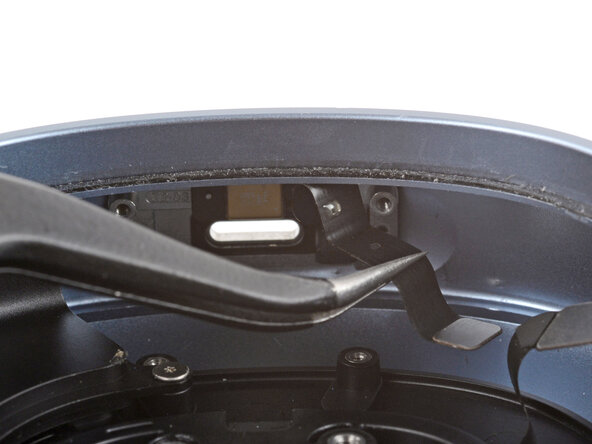
    2. Right Microphone Installation, Place the microphone: step 2, image 1 of 3 Right Microphone Installation, Place the microphone: step 2, image 2 of 3 Right Microphone Installation, Place the microphone: step 2, image 3 of 3
      • It may be easier to place the microphone with the ear cup standing up at an angle.

      • If your microphone has pre-installed adhesive, remove the liner.

      • Use tweezers to gently grip the microphone and put it into place.

      • Make sure the alignment pegs go through their cutouts and the cable is on the right side.

      • With the microphone properly aligned, use the flat end of a spudger to push the microphone into place.

      Ask FixBot

      Add Comment

    3. Right Microphone Installation, Fold the microphone cable: step 3, image 1 of 2 Right Microphone Installation, Fold the microphone cable: step 3, image 2 of 2
      • Use tweezers to gently push the cable inwards towards the microphone.

      • Don't fold or crease the cable—use the pre-folded sections to guide it into place.

      Ask FixBot

      Add Comment

Finish Line

Cancel: I did not complete this guide.

Spencer Day

Member since: 09/14/22

205,788 Reputation

1,267 Guides authored

0 Guide Comments

Add Comment

View Statistics:

Past 24 Hours: 0

Past 7 Days: 1

Past 30 Days: 16

All Time: 53