Free Shipping on Domestic Orders $75+

This translation was generated by a machine and has not been reviewed by a person yet. Speak this language? Review it.

Reply to a message

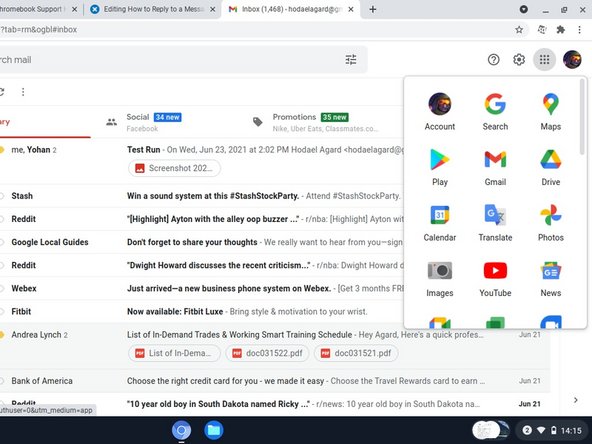
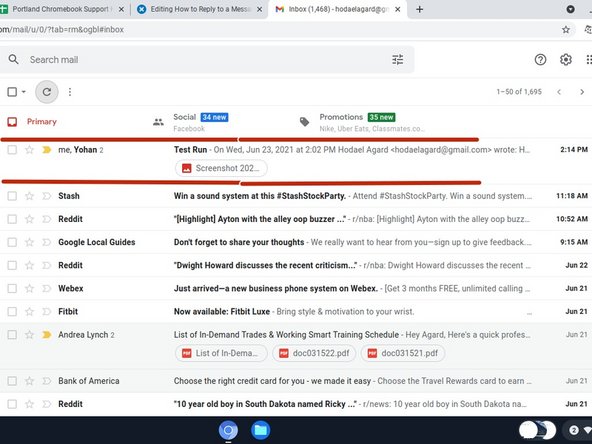
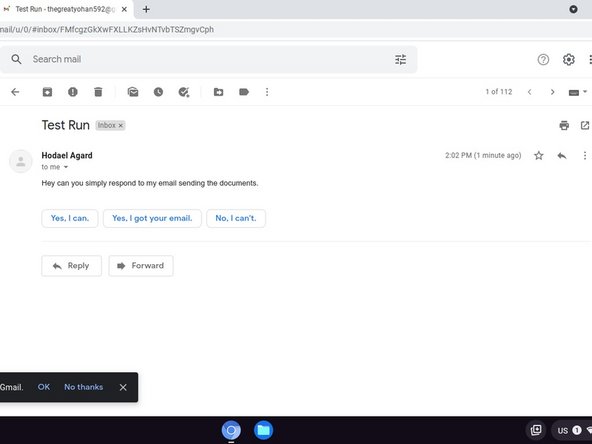
    1. Reply to a message, Reply to a message: step 1, image 1 of 3 Reply to a message, Reply to a message: step 1, image 2 of 3 Reply to a message, Reply to a message: step 1, image 3 of 3
      • Click SHIFT and Launcher, then click Gmail.

      • Click the message you want to reply to.

      • Click Reply if you want to reply only to the person who sent you the email. You can also choose to reply all to send a message to all addresses that received the original message.

      • Type your desired response.

      • Click Send.

      Ask FixBot

      Add Comment

Finish Line

Cancel: I did not complete this guide.

Koffi Junior Dessou

Member since: 06/28/21

4,858 Reputation

16 Guides authored

Team

RampUP America, Inc. Member of RampUP America, Inc.

Community

45 Members

12,277 Guides authored

0 Guide Comments

Add Comment

View Statistics:

Past 24 Hours: 1

Past 7 Days: 9

Past 30 Days: 48

All Time: 126