Free Shipping on Domestic Orders $75+

This translation was generated by a machine and has not been reviewed by a person yet. Speak this language? Review it.

Replacing the why! W253EU Fan

    1. Replacing the why! W253EU Fan, Battery from why! Remove W253EU: step 1, image 1 of 3 Replacing the why! W253EU Fan, Battery from why! Remove W253EU: step 1, image 2 of 3 Replacing the why! W253EU Fan, Battery from why! Remove W253EU: step 1, image 3 of 3
      • Turn off the computer.

      • Before each operation it is important to start with the removal of the accumulator.

      • Take the slide unlocked into position, remove the battery.

      Ask FixBot

      Add Comment

    1. Replacing the why! W253EU Fan, Access to RAM and CPU from why! W253EU: step 2, image 1 of 2 Replacing the why! W253EU Fan, Access to RAM and CPU from why! W253EU: step 2, image 2 of 2
      • Using a Philips #1 screwdriver, unscrew the 5 screws securing the cover.

      Ask FixBot

      Add Comment

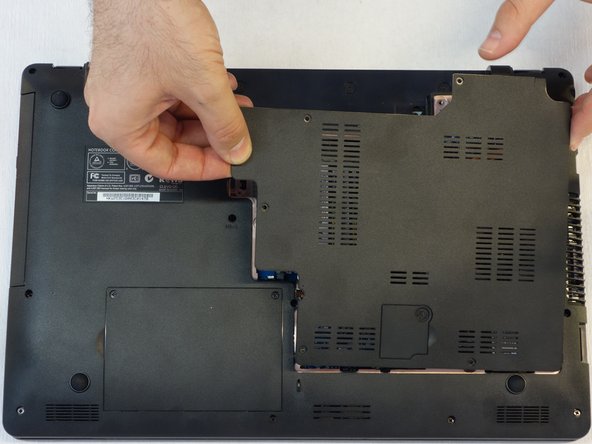
    2. Replacing the why! W253EU Fan: step 3, image 1 of 3 Replacing the why! W253EU Fan: step 3, image 2 of 3 Replacing the why! W253EU Fan: step 3, image 3 of 3
      • Push the screwdriver a few millimeters under the cover so that it can be touched with your fingers.

      • Now lift the cover carefully.

      • Attention! Disconnect the ventillator cable so that the cover can be completely removed (see next step).

      Ask FixBot

      Add Comment

    3. Replacing the why! W253EU Fan: step 4, image 1 of 1
      • Since the ventillator is mounted under the cover, its power supply cable must first be disconnected so that the cover can then be completely removed.

      Ask FixBot

      Add Comment

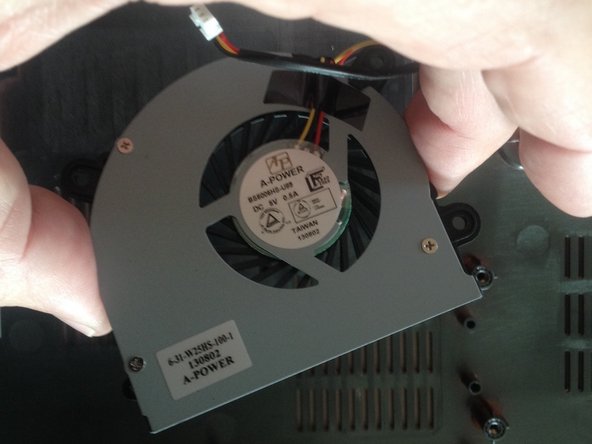
    1. Replacing the why! W253EU Fan, Fan: step 5, image 1 of 2 Replacing the why! W253EU Fan, Fan: step 5, image 2 of 2
      • Use a Phillips screwdriver to remove the 3 screws securing the fan to the bottom of the device.

      Ask FixBot

      Add Comment

Conclusion

To reassemble your device, follow the above steps in reverse order.

Cancel: I did not complete this guide.

Felice Suglia

Member since: 06/15/13

33,634 Reputation

283 Guides authored

0 Guide Comments

Add Comment

View Statistics:

Past 24 Hours: 3

Past 7 Days: 18

Past 30 Days: 61

All Time: 414