Introduction
This guide illustrates how to replace the RAM in your Toshiba Satellite.
What you need
-
-
-
Orient the laptop so that it is closed, faced down and has the battery facing away from you.
-
Use the Phillips 00 screwdriver to remove the 7.50mm screw from the panel.
 Ask FixBot
-
-
-
-
Rotate the laptop 90 degrees clockwise.
-
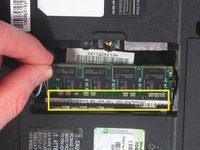
Pull back the two silver clips that hold the RAM in place.
-
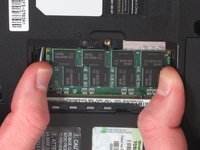
Gently pull the RAM out of the slot and lift up to remove the RAM from the laptop.
-
-


Conclusion
To reassemble your device, follow these instructions in reverse order.

Team

Cal Poly, Team 7-11, Maness Winter 2013 Member of Cal Poly, Team 7-11, Maness Winter 2013
CPSU-MANESS-W13S7G11
4 Members
60 Guides authored
