
MacBook Pro 13" Unibody Mid 2012 RAM Replacement

Last updated on Mar 21, 2018
Views: 440K
View statistics:
- Past 24 Hours:
- 19
- Past 7 Days:
- 151
- Past 30 Days:
- 595
- All Time:
- 439,814
Comments: 102
52 comments on steps, 50 guide comments.
Go to guide commentsCompleted: 613 614
613 people have marked this guide "completed." Will you be next?
614 people have marked this guide "completed." Including you — great job!
Favorites: 222 223
222 people have favorited (and subscribed to) this guide. Will you be next?
223 people have favorited (and subscribed to) this guide — including you!
Featured Guide
This guide has been found to be exceptionally cool by the iFixit staff.
Introduction
Go to step 1 ↓Upgrade the RAM in your Mid 2012 MacBook Pro 13" Unibody.
What you need
Fix Kit
This kit contains all the parts and tools needed to complete this guide.

Parts
-
-
PC3-12800 2 GB RAM Chip$25.99
-


Tools
-
Spudger4.9


-
-
-
Remove the following ten screws:
-
Three 14.4 mm Phillips #00 screws
-
Three 3.5 mm Phillips #00 screws
-
Four 3.5 mm shouldered Phillips #00 screws
 Ask FixBot
-
-
-
Use your fingers to pry the lower case away from the body of the MacBook near the vent.
-
Remove the lower case.
-
-
-
-
-
-
Use the edge of a spudger to pry the battery connector upwards from its socket on the logic board.
-
-
-
Bend the battery cable slightly away from its socket on the logic board so it does not accidentally connect itself while you work.
-
-
-


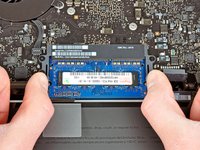
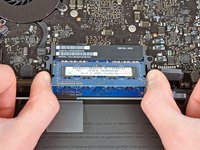

To reassemble your device, follow these instructions in reverse order.
Cancel: I did not complete this guide.
613 other people completed this guide.


50 Guide Comments
Just replaced my 4GB with 16GB of PNY from Best Buy. AWESOME difference in performance!!
Any memory kit that is either validated by Apple or that has the proper channel configuration (9-9-9-24) is okay to use. If you are looking for pure performance RAM, a kit of Corsair Vengeance RAM is okay to use (again, check the channel configuration), but most people will benefit from a kit of Corsair Mac Memory or the kit that iFixit provides in the volume of your choice.
