Free Shipping on Domestic Orders $75+

This translation was generated by a machine and has not been reviewed by a person yet. Speak this language? Review it.

Replace your Desktop PC CPU

    1. Replace your Desktop PC CPU, Open the PC: step 1, image 1 of 2 Replace your Desktop PC CPU, Open the PC: step 1, image 2 of 2
      • First, release the screws from the housing.

      • After that, unplug the cover.

      Ask FixBot

      Add Comment

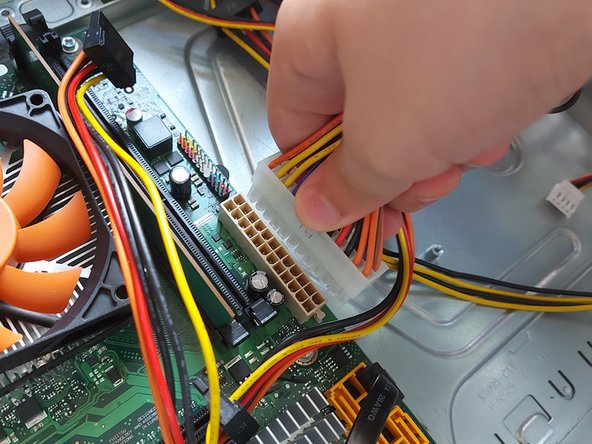
    2. Replace your Desktop PC CPU, Remove the cable: step 2, image 1 of 3 Replace your Desktop PC CPU, Remove the cable: step 2, image 2 of 3 Replace your Desktop PC CPU, Remove the cable: step 2, image 3 of 3
      • Then, you must pull out the hard drive cables.

      • And the cables from the motherboard as well.

      Ask FixBot

      Add Comment

    3. Replace your Desktop PC CPU, Remove the CPU cooler: step 3, image 1 of 1
      • Now you need to remove the CPU cooler.

      Ask FixBot

      Add Comment

    4. Replace your Desktop PC CPU, Removing the CPU: step 4, image 1 of 2 Replace your Desktop PC CPU, Removing the CPU: step 4, image 2 of 2
      • First, you need to remove the thermal paste with paper.

      • Now, the CPU is removed by lifting a small lever next to the CPU.

      • Now, the CPU must be lifted out of the socket; to do this, you must be careful and lift the CPU from both sides.

      Ask FixBot

      Add Comment

    5. Replace your Desktop PC CPU, Install a new CPU: step 5, image 1 of 2 Replace your Desktop PC CPU, Install a new CPU: step 5, image 2 of 2
      • Now you must install the CPU.

      • And apply thermal paste.

      Ask FixBot

      Add Comment

Conclusion

Follow these steps in reverse order to reassemble your device.

Cancel: I did not complete this guide.

Raftech07

Member since: 06/06/20

121 Reputation

1 Guide authored

0 Guide Comments

Add Comment

View Statistics:

Past 24 Hours: 4

Past 7 Days: 39

Past 30 Days: 113

All Time: 320