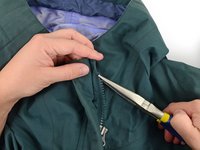
Replace the Slider on a Plastic Tooth Zipper

Archived Guide
This guide is retained solely for historical purposes. Use the updated version of the guide to perform your repair.

What you need

Video Overview

  1. Replace the Slider on a Plastic Tooth Zipper, Plastic Zipper Slider: step 1, image 1 of 3 Replace the Slider on a Plastic Tooth Zipper, Plastic Zipper Slider: step 1, image 2 of 3 Replace the Slider on a Plastic Tooth Zipper, Plastic Zipper Slider: step 1, image 3 of 3
    • Locate the top of the zipper on the side with the slider.

    • Use end nippers to cut the stop off of the zipper.

    • Be careful to only cut the plastic, not the fabric.

  2. Replace the Slider on a Plastic Tooth Zipper: step 2, image 1 of 1
    Tool used on this step:
    Tweezers
    $4.99
    Buy
    • Use tweezers to remove any remaining pieces of the stop from the garment.

  3. Replace the Slider on a Plastic Tooth Zipper: step 3, image 1 of 3 Replace the Slider on a Plastic Tooth Zipper: step 3, image 2 of 3 Replace the Slider on a Plastic Tooth Zipper: step 3, image 3 of 3
    • Slide the slider off of the garment.

  4. Replace the Slider on a Plastic Tooth Zipper: step 4, image 1 of 3 Replace the Slider on a Plastic Tooth Zipper: step 4, image 2 of 3 Replace the Slider on a Plastic Tooth Zipper: step 4, image 3 of 3
    • Insert the new slider onto the zipper.

    • You may need to tug a little to get the slider over the webbing from the old stop.

    • Make sure the zipper slider is oriented right-side up when you slide it back onto the zipper.

  5. Replace the Slider on a Plastic Tooth Zipper: step 5, image 1 of 3 Replace the Slider on a Plastic Tooth Zipper: step 5, image 2 of 3 Replace the Slider on a Plastic Tooth Zipper: step 5, image 3 of 3
    • Grab a replacement stop.

    • Position the new stop over the webbing in the same place where the old stop was located.

  6. Replace the Slider on a Plastic Tooth Zipper: step 6, image 1 of 2 Replace the Slider on a Plastic Tooth Zipper: step 6, image 2 of 2
    • Use pliers to crimp the stop into place.

Conclusion

For replacement parts or further assistance, contact Patagonia Customer Service.

Brittany McCrigler

Member since: 03/05/12

90,451 Reputation

142 Guides authored

Team

iFixit Member of iFixit

Staff

123 Members

23,648 Guides authored

0 Guide Comments

Add Comment

View Statistics:

Past 24 Hours: 41

Past 7 Days: 199

Past 30 Days: 913

All Time: 8,034