
Repairing Quasar Microwave Fan

Melanie and 7 other contributors
Last updated on Dec 2, 2020
Views: 2.2K
View statistics:
- Past 24 Hours:
- 2
- Past 7 Days:
- 31
- Past 30 Days:
- 106
- All Time:
- 2,227
Comments: 1
1 comment on steps.
Completed: 1 2
1 person has marked this guide "completed." Will you be next?
2 people have marked this guide "completed." Including you — great job!
Favorites: 4 5
4 people have favorited (and subscribed to) this guide. Will you be next?
5 people have favorited (and subscribed to) this guide — including you!
Better Introduction
Improve this guide by completing or revising its introduction.
What you need

-
-
-
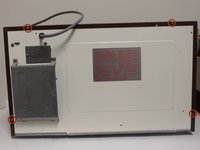
Remove the eight screws holding the wood-patterned cover to the microwave frame.
-
The first four screws are located on either side of the microwave front.
-
-
-
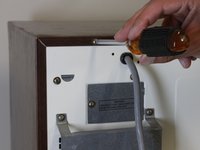
Remove the additional four screws securing the wood-paneled case to the microwave frame.
-
-
-
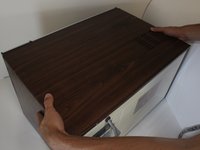
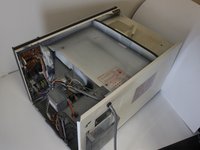
Placing your hands on either side of the case, slide the case back gently until you feel it completely separate from the microwave frame.
-
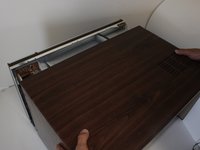
Lift the case upward slowly until the case is free of the microwave.
-
-
-
-
-
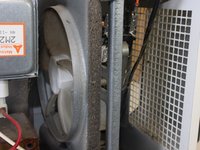
Locate the fan in the newly exposed interior.
-
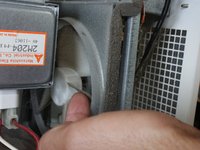
Try spinning the fan with your finger. If it spins freely, the fan is not jammed.
-
If the fan does not spin freely, locate what is jamming the fan and remove it.
-
-
-
If the fan is not jammed yet still does not work, check that there are no disconnected wires, especially to the fan.
-
In order to work properly, there should be two wires going in and out of the fan. If you are missing either of these wires, locate the loose wire/s and connect them.
-
-

 Ask FixBot







To reassemble your device, follow these instructions in reverse order.
Cancel: I did not complete this guide.
One other person completed this guide.

Team

Cal Poly, Team 2-12, Propen Fall 2012 Member of Cal Poly, Team 2-12, Propen Fall 2012
CPSU-PROPEN-F12S2G12
3 Members
72 Guides authored
