
Remove corrosion from battery terminal

JACOB SCHRIER and one other contributor
Last updated on Jul 17, 2020
Views: 3.6K
View statistics:
- Past 24 Hours:
- 4
- Past 7 Days:
- 21
- Past 30 Days:
- 77
- All Time:
- 3,561
Comments: 8
8 comments on steps.
Completed: 0 1
No one has marked this guide "completed." Will you be the first?
1 person has marked this guide "completed." It's you — great job!
Favorites: 0 1
No one has favorited (and subscribed to) this guide. Will you be the first?
1 person has favorited (and subscribed to) this guide — and that's you!
Action Shots
Be an action hero! This guide needs images that better demonstrate how to perform specific actions.
Needs Better Images
Better photos will improve this guide. Help out by taking, editing, or uploading new ones!
Needs More Images
A few more images would make this guide's procedures crystal clear.
Community-Contributed Guide
An awesome member of our community made this guide. It was not created by iFixit staff.
Introduction
Go to step 1 ↓If the Ring video doorbell battery dies, you connect it to a charger, and it quickly claims to be fully charged but then dies shortly after being removed from the charger you may need remove some corrosion from the battery terminals, or other areas of the PCB.
What you need
Tools
-
Philips Head Screwdriver Sized J00
The screws are prone to stripping
-
-
-
-


-
-
-
Start by removing the 4 screws to take off the aluminum face-plate.
 Ask FixBot
-
-
-
Pry the aluminum face-plate carefully using a plastic spudger while applying gentle pressure. This will reveal the 4 black screws underneath.
-
-
-
Carefully pry the plastic cover with a pick to pop the insert out. Watch the micro USB port that is sticking out.
-
-
-
Gently pry up the battery from underneath the connector. But remember the orientation, red wires to the outside exposed wire on the connector facing upward.
-
-
-
Two Lithium polymer batteries are connected back to back and in parallel to the regulator. The batteries are rated at 9.47w @ 3.75v each.
-
When you are satisfied that the battery is properly installed, the new battery should have enough charge that you will see at least one of several LED's light up. You can then close up. But if not, charge the unit via USB to see if the LED's are functioning. If not, check the battery connection.
-
-
-
-
-
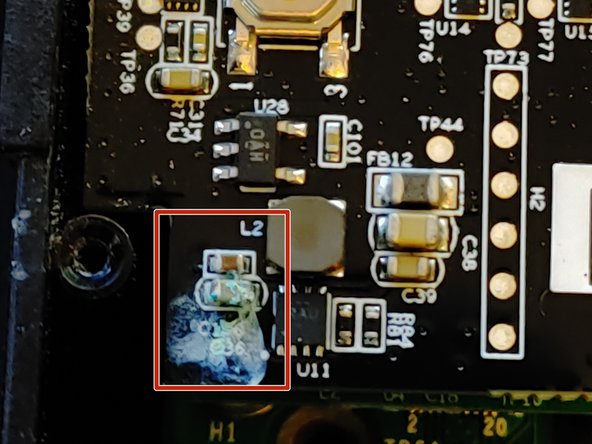
Examine your ring video doorbell motherboard for corrosion on any resistors, capacitors, or battery terminals.
-
-
-
-
Disconnect the battery by lifting the connector straight up.
-
Remove the three philips size 0 screws
-
Lift the board carefully and rotate it to the right so as to leave the camera connection alone.
-
Examine the rear of the top pcb, and the face of the lower pcb.
-
-
-
Using white vinegar, clean any corrosion off of the battery terminals or anywhere else you find it, including the battery cables.
-
Then use isopropyl alcohol to clean the vinegar off of the pcb.
-
Coat the problem areas you just cleaned with dielectric grease of your choice.
-
Reassemble in reverse order.
-
-




Once complete, follow the battery removal guide in reverse order to reassemble.

