Introduction
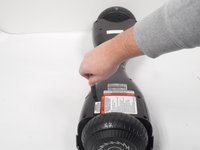
Use this guide to replace the battery component of the Razor Hovertrax 2.0.
The battery serves as the powerhouse of the board, providing the necessary energy to drive the motors of the wheel and control the board's movements.
It is located under the plastic panel adjacent to the charging port.
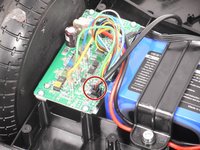
Be mindful of the circuit board, for there is a charged capacitor active. Be careful because if you accidentally touch it, it will send a shock to your body with a high amount of amps.
What you need
-
-
-
Use a #2 Philips screwdriver to remove the eight 18.5 mm screws from the bottom of the Hovertrax 2.0.
 Ask FixBot
-
-
-
To remove the led connector from the board, press the clip in with your fingers and gently pull up.
-
-
-
-
Disconnect the battery connector by grabbing the black side with one hand and the yellow side with the other hand and gently pull apart. (Try not to pull on the wires, it could damage them)
-
-
-
Remove the two 17.2 mm hex head bolts using the 4 mm hex screwdriver that secures the battery in place.
-
-






To reassemble your device, follow these instructions in reverse order.

Team

University of New Orleans, Team 3-1, McDonald Fall 2023 Member of University of New Orleans, Team 3-1, McDonald Fall 2023
UNO-MCDONALD-F23S3G1
3 Members
60 Guides authored
