
Ray-Ban Round RB2180 Lens Replacement

Last updated on Oct 23, 2026
Views: 16
View statistics:
- Past 24 Hours:
- 5
- Past 7 Days:
- 16
- Past 30 Days:
- 16
- All Time:
- 16
Comments: 0
No one has left comments on this guide. Will you be first?
Go to guide commentsCompleted: 0 1
No one has marked this guide "completed." Will you be the first?
1 person has marked this guide "completed." It's you — great job!
Favorites: 0 1
No one has favorited (and subscribed to) this guide. Will you be the first?
1 person has favorited (and subscribed to) this guide — and that's you!
Community-Contributed Guide
An awesome member of our community made this guide. It was not created by iFixit staff.
Introduction
Go to step 1 ↓This guide shows how to replace the lenses of Ray-Ban Round RB2180 sunglasses. The RB2180 has an acetate (plastic) front with round rims, and the lenses are press-fitted into a groove in the rim: there are no screws and no tools are needed. You flex the rim slightly, push the old lens out with your thumb and press the new one in until it is seated all the way round. In our video this is done by hand at room temperature, without heat.
Before you start, read the code printed on the inside of the temple arm, for example "RB2180 901 49□22 150". RB2180 is the model, 901 the frame colour, 49 the lens width in millimetres (the number in front of the □ symbol), 22 the bridge and 150 the temple length. The RB2180 is made in two lens sizes, 49 and 51 mm, and they are not interchangeable. If you cannot read the code, measure the lens from side to side at its widest point: that measurement in millimetres is the lens size. These lenses are for the sun version, RB2180; optical frames marked RX2180 or RB2180V may have a different fit.
Replacement lenses for this frame exist as original Ray-Ban lenses, which carry the Ray-Ban logo on the right lens and an "RB" engraving on the left, and as compatible (non-original) lenses from independent manufacturers, which have no logo. You can check the lens options for this model, in sizes 49 and 51, here: Ray-Ban Round RB2180 replacement lenses.
What you need
Tools

Video Overview
Video of the whole procedure.
-
-
-
Work over a soft, light-coloured cloth on a clear table, so that a lens is not scratched if it drops.
-
Open the temple arms and hold the frame by the rim of the lens you are removing, with the inside of the frame facing you.
-
Flex the rim gently with your fingers and, at the same time, push the inner surface of the lens with the pad of your thumb, near the edge. The lens comes out of the groove at that point first; then ease the rest of it out of the rim.
 Ask FixBot
-
-
-
Wipe the groove of the empty rim with the microfiber cloth to remove dust.
-
Check that the new lens is for the correct side: each lens has its own side and the curved side faces outwards. Hold it against the rim to compare the shape.
-
On original lenses, the Ray-Ban logo goes on the right lens as worn, at the upper outer corner. Compatible lenses have no logo, so go by the shape.
-
-
-
Hold the frame with the front facing you.
-
Slide one edge of the lens into the groove of the rim first.
-
With your thumbs, press the surface of the lens inwards while your other fingers support the rim from behind. Work your way round the lens, flexing the rim a little if needed, until the edge is inside the groove all the way round.
-
-
-
-
Run your finger all the way round the lens: no part of the edge should stick out of the groove.
-
Try to turn the lens gently. If it moves, it is not fully seated, or it is not the right size for your frame.
-
Repeat steps 1 to 4 on the other side, remove the stickers from the new lenses and clean them with the microfiber cloth.
-
-


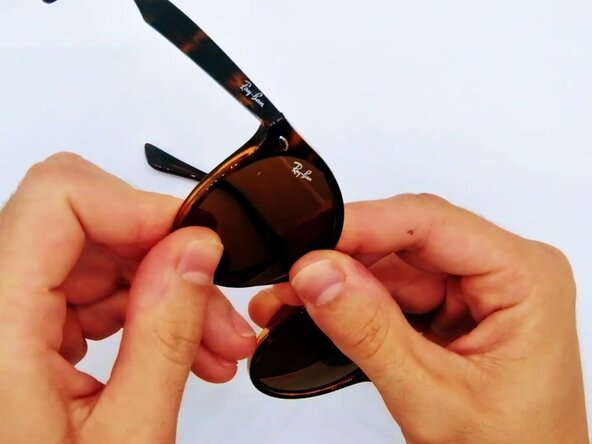

Replace one lens at a time: the other lens serves as a reference for the correct side and orientation. If a lens does not fit, check the code on the temple again: 49 mm and 51 mm lenses are not interchangeable, and lenses from other Ray-Ban models will not fit the RB2180.

