RAM memory replacement for why! W253EU

Felice Suglia and 3 other contributors
Last updated on Feb 2, 2024
Views: 842
View statistics:
- Past 24 Hours:
- 2
- Past 7 Days:
- 19
- Past 30 Days:
- 85
- All Time:
- 842
Comments: 0
No one has left comments on this guide. Will you be first?
Go to guide commentsCompleted: 0 1
No one has marked this guide "completed." Will you be the first?
1 person has marked this guide "completed." It's you — great job!
Favorites: 1 2
1 person has favorited (and subscribed to) this guide. Will you be next?
2 people have favorited (and subscribed to) this guide — including you!
Community-Contributed Guide
An awesome member of our community made this guide. It was not created by iFixit staff.
Introduction
Go to step 1 ↓Here you will learn how to change the RAM on the PC why! W253EU.
What you need
Parts
-
RAM Speicher Modul 8GB (Kingston Technology SO-DDR3 1600MHz 8GB)
from why! open computing shop
-
-
-
Turn off the computer.
-
Take the slide unlocked into position, remove the battery.
 Ask FixBot
-
-
-
-
-
Using a Philips #1 screwdriver, unscrew the 5 screws securing the cover.
-
-
-
-
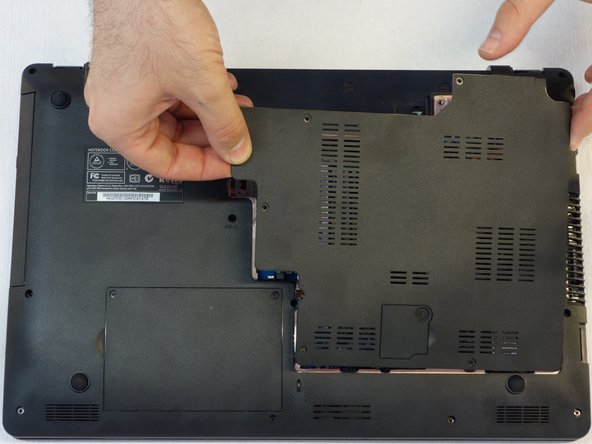
Push the screwdriver a few millimeters under the cover so that it can be touched with your fingers.
-
Now lift the cover carefully.
-
Attention! Disconnect the ventillator cable so that the cover can be completely removed (see next step).
-
-
-
Since the ventillator is mounted under the cover, its power supply cable must first be disconnected so that the cover can then be completely removed.
-
-
-
-
-
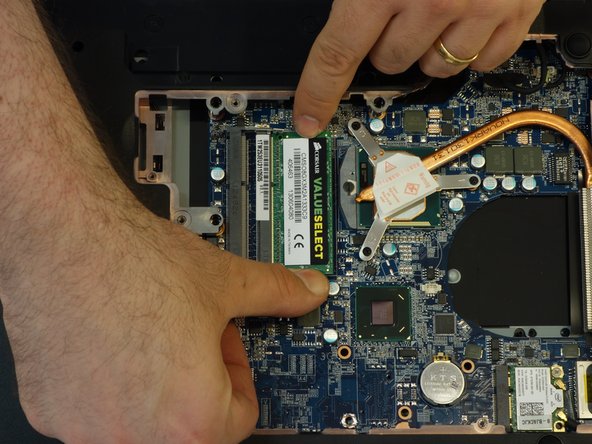
Locate the two memory modules.
-
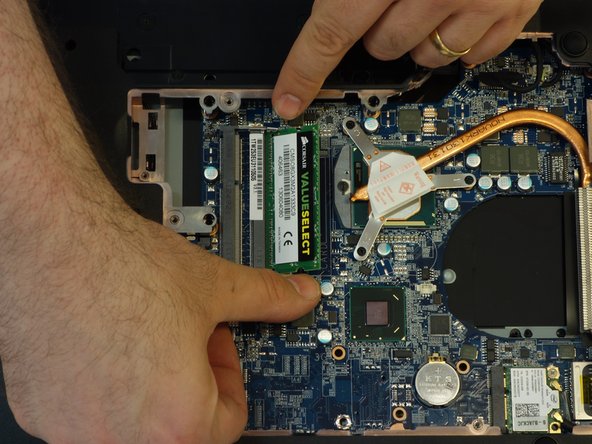
Release the locking spring on both sides of the module.
-
Now lift the module with its connector slightly.
-
-
-
Now remove the module from its connector by pulling it out symmetrically to its axis.
-
If necessary, repeat the procedure from the previous step with the second module.
-
Attention: the two memory modules must be identical, mainly in terms of their memory capacity!
-
-







To reassemble, follow the instructions in reverse order.
Special thanks to these translators:
100%

oldturkey03 is helping us fix the world! Want to contribute?
Start translating ›