Free Shipping on Domestic Orders $75+

PowerMac G4 M5183 Graphics Card Removal

What you need

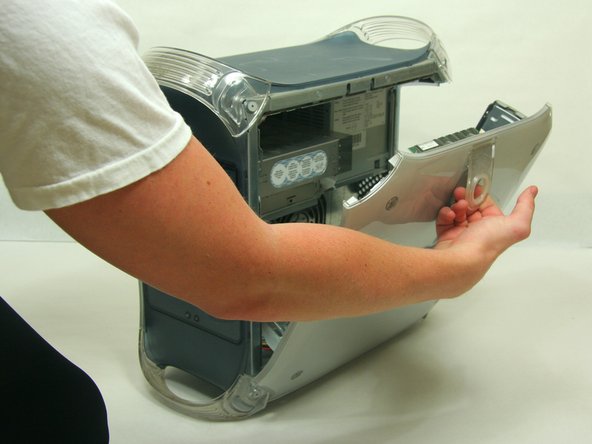
    1. PowerMac G4 M5183 Graphics Card Removal, Opening PowerMac G4 M5183 Case: step 1, image 1 of 2 PowerMac G4 M5183 Graphics Card Removal, Opening PowerMac G4 M5183 Case: step 1, image 2 of 2
      • Pull on outer latch.

      • Lower door until it is level with your work surface.

      • Before working on the computer make sure it is not plugged into a power supply, then touch a metal object. This discharges static electricity, which could damage the computer.

      Ask FixBot

      Add Comment

    1. PowerMac G4 M5183 Graphics Card Removal, Graphics Card: step 2, image 1 of 2 PowerMac G4 M5183 Graphics Card Removal, Graphics Card: step 2, image 2 of 2
      • Remove the single screw with the Phillips #1 screwdriver.

      • Pull the graphics card up and out.

      Ask FixBot

      Add Comment

Finish Line

Cancel: I did not complete this guide.

13 other people completed this guide.

Justin Petrilli

Member since: 01/21/10

3,204 Reputation

11 Guides authored

Team

Cal Poly, Team 13-24, Maness Winter 2010 Member of Cal Poly, Team 13-24, Maness Winter 2010

CPSU-MANESS-W10S13G24

4 Members

50 Guides authored

2 Guide Comments

Do I need to avoid static to protect the board?

Jim Robson - Reply Share

Es ist eine deutsche Anleitung, aber auf der iFixit Übersicht als Englisch gekennzeichnet.

Toni Makkaroni - Reply Share

Add Comment

View Statistics:

Past 24 Hours: 1

Past 7 Days: 11

Past 30 Days: 38

All Time: 10,487