Introduction
The time and date, as well as other settings, are kept by the PRAM battery when your machine is off.
What you need
-
-
-
Turn the keyboard locking screw so that it is parallel to the space bar.
-
Pull the keyboard release tabs toward you and lift up on the keyboard until it pops free.
-
Lift the keyboard out by pulling it up and away from you. Rest the keyboard, face down, on top of the track pad.
 Ask FixBot
-
-
-
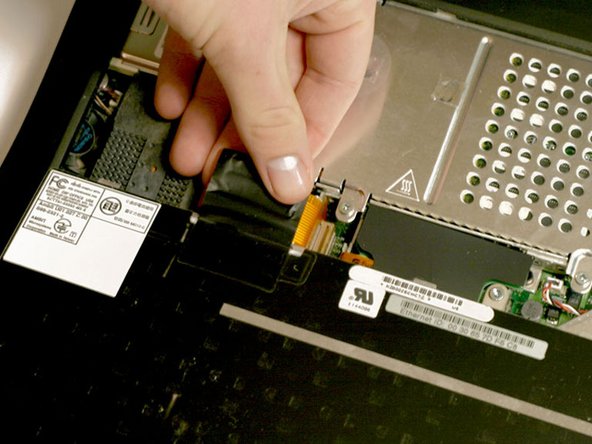
Pull the keyboard ribbon straight up from the logic board. Place the keyboard aside.
-
-
-
-
-
-
Remove the two silver Phillips #1 screws that attach the heat shield to the internal metal framework.
-
Lift the heat shield up and pull it toward you.
-
-
-
-
-
Firmly grasp the plastic tab attached to the Airport card and pull up and then to the right.
-
-
-
-
-
Pull the battery cable directly up from the logic board.
-
Remove the battery from its holder by pulling up and to the left.
-
-



To reassemble your device, follow these instructions in reverse order.
Cancel: I did not complete this guide.
27 other people completed this guide.
Attached Documents

6 Guide Comments
Frankly speaking I do not have idea why do I need steps 2-7 to replace battery? Why I can't go directly to step 8 if it is possible? BTW - the battery seems to be composed from 4 standard batteries. Is anyone aware how to assembly new battery? It is not available as spare part (616-0108)
Agreed, I just successfully removed my PRAM battery skipping all those steps, just popped the keyboard out, removed the DVD drive from the right-hand out and popped that bad boy out, no problemo.
I read that you "removed the DVD drive from the right-hand out...." I'm baffled as to what you mean or how that is done. Can you explain that step?
Why do I need to remove the airport card? It's just like telling somebody to remove their shoes to take off their hat?
