
Poukaran ZRW-TD-SRK2 LED Replacement

andrez oceguera and
Last updated on Dec 20, 2023
Views: 717
View statistics:
- Past 24 Hours:
- 5
- Past 7 Days:
- 26
- Past 30 Days:
- 73
- All Time:
- 717
Comments: 0
No one has left comments on this guide. Will you be first?
Go to guide commentsCompleted: 0 1
No one has marked this guide "completed." Will you be the first?
1 person has marked this guide "completed." It's you — great job!
Favorites: 0 1
No one has favorited (and subscribed to) this guide. Will you be the first?
1 person has favorited (and subscribed to) this guide — and that's you!
Introduction
Go to step 1 ↓If your Poukaran ZRW-TD-SRK2 LED desk lamp is experiencing issues such as flickering, , this guide is here to assist you in repairing the problem rather than resorting to disposal. In this step-by-step tutorial, we will walk you through the process of diagnosing and fixing common LED desk lamp malfunctions. Before you start, gather essential tools such as screwdrivers, a multimeter, a pry tool (if necessary), and a soldering iron. Safety is paramount, so keep the lamp unplugged and exercise caution with sharp edges and soldering equipment. Our guide covers disassembling the lamp safely, identifying and replacing faulty LED strips, and testing the repaired lamp. By the end, not only will your LED desk lamp be back in working order, but you'll also be contributing to a more sustainable approach to electronic devices.
What you need


-
-
-
Use a Phillips #1 screwdriver to remove the 7.5mm screws securing the front of the lamp's outer casing or lid.
 Ask FixBot
-
-
-
Use a Phillips #1 screwdriver to remove the last two 7.5 mm screws securing the back of the lamp's outer casing or lid.
-
-
-
-
Once the lid is off, locate and remove the top plate covering the internal components of the lamp.
-
-
-
Use a soldering iron to carefully desolder the wires connecting the faulty LED strips. Ensure you're desoldering the correct connections. Solder the new LED strips in place, connecting the wires securely to the designated points on the lamp's circuit board.
-
-


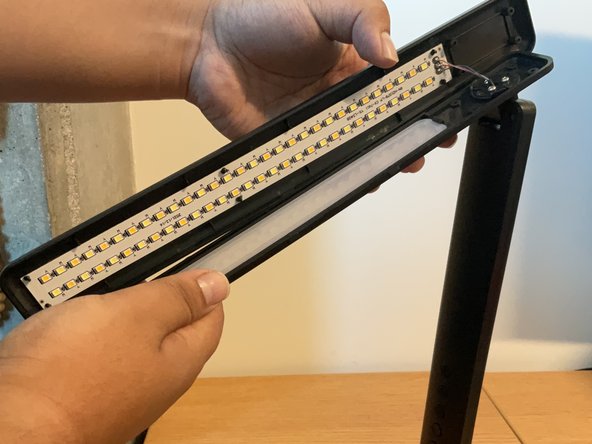
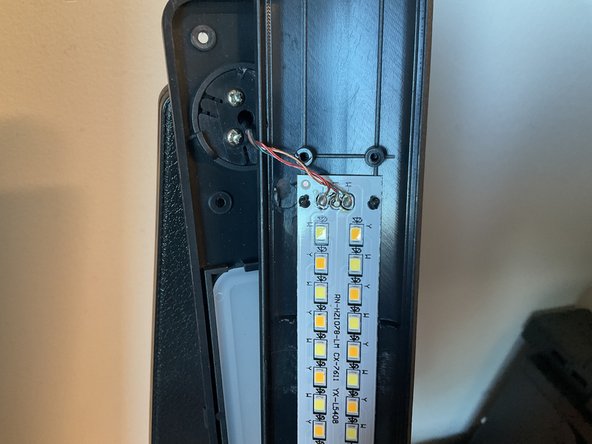


To reassemble your device, follow these instructions in reverse order. Ensure each component is securely in place and all connections are properly aligned.

Team

CSU Los Angeles, Team 2-1, Briggs Fall 2023 Member of CSU Los Angeles, Team 2-1, Briggs Fall 2023
CSULA-BRIGGS-F23S2G1
5 Members
60 Guides authored
