Free Shipping on Domestic Orders $75+

PlayStation 5 Slim Console Covers Replacement

Views: 31K

View statistics:

Past 24 Hours:
43
Past 7 Days:
367
Past 30 Days:
1,650
All Time:
31,196
Comments: 2

2 comments on steps.

Completed: 34

34 people have marked this guide "completed." Will you be next?

Favorites: 2

2 people have favorited (and subscribed to) this guide. Will you be next?

Time Required: 5 minutes
Difficulty: Very easy
Featured Guide

This guide has been found to be exceptionally cool by the iFixit staff.

PlayStation 5 Slim Console Covers Replacement

Introduction

Go to step 1 ↓

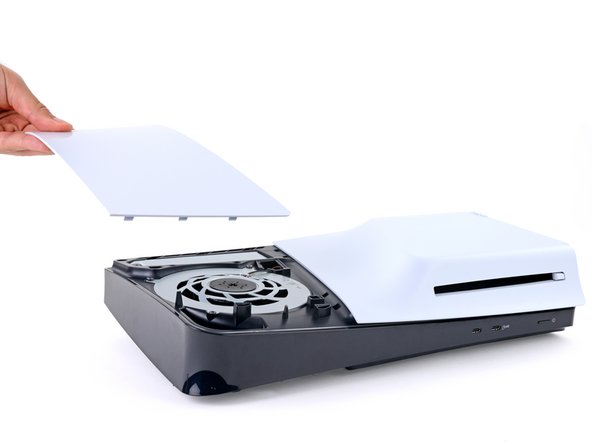
Use this guide to replace, change, or upgrade the console covers (aka casings, shells, or housings) on your PlayStation 5 Slim.

What you need

    1. PlayStation 5 Slim Console Covers Replacement, Prepare your PlayStation for disassembly: step 1, image 1 of 3 PlayStation 5 Slim Console Covers Replacement, Prepare your PlayStation for disassembly: step 1, image 2 of 3 PlayStation 5 Slim Console Covers Replacement, Prepare your PlayStation for disassembly: step 1, image 3 of 3
      • Before starting your repair:

      • Shut down your console and unplug all cables and accessories.

      • Remove any stands supporting your device and lay it down.

      Ask FixBot

      Add Comment

    1. PlayStation 5 Slim Console Covers Replacement, Remove the console covers: step 2, image 1 of 3 PlayStation 5 Slim Console Covers Replacement, Remove the console covers: step 2, image 2 of 3 PlayStation 5 Slim Console Covers Replacement, Remove the console covers: step 2, image 3 of 3
      • Each console cover is secured with hooks along the rear edge and clips along the front edge.

      • To remove a cover, firmly pull up the front edge to release the clips.

      • You'll hear distinct "pops" as the clips release.

      • Remove the cover.

      Ask FixBot

      Add Comment

    2. PlayStation 5 Slim Console Covers Replacement: step 3, image 1 of 3 PlayStation 5 Slim Console Covers Replacement: step 3, image 2 of 3 PlayStation 5 Slim Console Covers Replacement: step 3, image 3 of 3
      • Use the same process to remove the three remaining covers.

      • To reinstall a cover, place the hooks into their cutouts along the rear edge and firmly press the front edge of the cover into place to re‑engage the clips.

      Ask FixBot

      Add Comment

Conclusion

Congratulations on completing your repair!

Click here for more PlayStation 5 Slim repair guides.

Repair didn’t go as planned? Try some basic troubleshooting, or ask our Answers community for help.

Cancel: I did not complete this guide.

34 other people completed this guide.

Spencer Day

Member since: 09/14/22

207,272 Reputation

1,266 Guides authored

Team

iFixit Member of iFixit

Staff

121 Members

72,907 Guides authored

0 Guide Comments

Add Comment

View Statistics:

Past 24 Hours: 43

Past 7 Days: 367

Past 30 Days: 1,650

All Time: 31,196