Introduction
The Sony PlayStation 2 Slim relies on a CMOS battery, essentially a modified battery designed to power the CMOS chip in the hardware. This chip is responsible for storing boot settings, system time, and date. A faulty CMOS battery can cause faults in game saves, incorrect system time, or prevent the system from powering up.
What you need
-
-
-
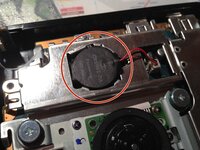
Locate the battery on the motherboard. The battery will be a CR2032 Button Cell Battery
-
Carefully use a metal spudger to pull the battery out of the metal housing
-
Once the battery is fully removed, remove the connector upwards from the motherboard
-




To reassemble your device, follow these instructions in reverse order.
Cancel: I did not complete this guide.
5 other people completed this guide.


3 Guide Comments
why would i need to do this?
What do I replace the battery with? Can I re-apply the rubber casing of the original battery onto a new 2032 or what?
