15% Off Selected iFixit Tools — Limited Time
Free Shipping on Domestic Orders $75+

Panasonic DVD-RV31 Player Disk Drive Replacement

What you need

  1. Panasonic DVD-RV31 Player Disk Drive Replacement, Disk Tray Cover: step 1, image 1 of 1
    • Eject the disk tray from the DVD player before removing power supply.

    Ask FixBot

    Add Comment

  2. Panasonic DVD-RV31 Player Disk Drive Replacement: step 2, image 1 of 1
    • Evenly lift upward on the disk tray front cover (not slanted, as pictured). This will allow for easier disassembly of the player.

    Ask FixBot

    Add Comment

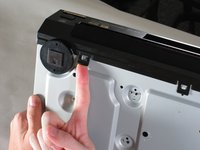
  3. Panasonic DVD-RV31 Player Disk Drive Replacement, Outer Case: step 3, image 1 of 2 Panasonic DVD-RV31 Player Disk Drive Replacement, Outer Case: step 3, image 2 of 2
    • Remove the three screws running along the back edge of case cover.

    • Remove the two screws from each side of the case cover.

    Ask FixBot

    Add Comment

  4. Panasonic DVD-RV31 Player Disk Drive Replacement: step 4, image 1 of 1
    • Grab edges of the cover with your hands. Pull outward slightly, then straight up.

    Ask FixBot

    Add Comment

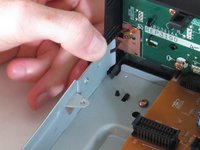
  5. Panasonic DVD-RV31 Player Disk Drive Replacement, Front Panel: step 5, image 1 of 2 Panasonic DVD-RV31 Player Disk Drive Replacement, Front Panel: step 5, image 2 of 2
    • Lift up the five tabs securing the front panel to the chassis. There are three on the bottom, and two on the inside edges of the panel. Panel should then lift off the player.

    Ask FixBot

    Add Comment

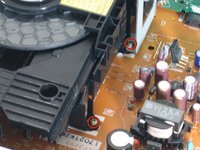
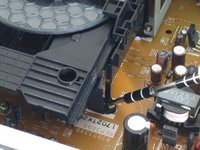
  6. Panasonic DVD-RV31 Player Disk Drive Replacement, Disk Drive: step 6, image 1 of 3 Panasonic DVD-RV31 Player Disk Drive Replacement, Disk Drive: step 6, image 2 of 3 Panasonic DVD-RV31 Player Disk Drive Replacement, Disk Drive: step 6, image 3 of 3
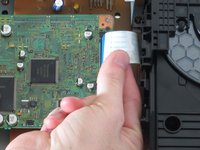
    • Locate the four screws securing the disk drive assembly. There are two on each side.

    • Use a narrow screwdriver to remove all four screws.

    • Remove the blue ribbon wire from its connector. When doing this, be cautious to not damage the connector.

    Ask FixBot

    Add Comment

  7. Panasonic DVD-RV31 Player Disk Drive Replacement: step 7, image 1 of 1
    • Lift assembly by the front to pull metal bracket from the power board.

    • Pull up back end and lift drive out.

    Ask FixBot

    Add Comment

  8. Panasonic DVD-RV31 Player Disk Drive Replacement: step 8, image 1 of 1
    • With the drive assembly separate from the player, hold as shown and pull the bracket edges away from the disk drive.

    • Lift bracket off and reserve for re-assembly.

    Ask FixBot

    Add Comment

Conclusion

To reassemble your device, follow these instructions in reverse order.

Cancel: I did not complete this guide.

2 other people completed this guide.

William

Member since: 04/26/11

283 Reputation

2 Guides authored

Team

Cal Poly, Team 18-20, Garner Spring 2011 Member of Cal Poly, Team 18-20, Garner Spring 2011

CPSU-GARNER-S11S18G20

4 Members

14 Guides authored

0 Guide Comments

Add Comment

View Statistics:

Past 24 Hours: 1

Past 7 Days: 7

Past 30 Days: 39

All Time: 6,207