
Palm Treo 700P Camera Replacement

John Rainier Solanzo and 3 other contributors
Last updated on Jan 28, 2014
Views: 1.1K
View statistics:
- Past 24 Hours:
- 0
- Past 7 Days:
- 2
- Past 30 Days:
- 33
- All Time:
- 1,061
Comments: 1
1 guide comment.
Go to guide commentsCompleted: 0 1
No one has marked this guide "completed." Will you be the first?
1 person has marked this guide "completed." It's you — great job!
Favorites: 0 1
No one has favorited (and subscribed to) this guide. Will you be the first?
1 person has favorited (and subscribed to) this guide — and that's you!
Needs Better Images
Better photos will improve this guide. Help out by taking, editing, or uploading new ones!
Inconsistent Images
Updating the images on this guide to be more consistent with the prerequisites would increase its awesomeness.
Confusing Text
Some of this guide's text is confusing, duplicated, or off-topic. Clarify it by editing!
Action Shots
Be an action hero! This guide needs images that better demonstrate how to perform specific actions.
Better Introduction
Improve this guide by completing or revising its introduction.
What you need
Tools

-
-
-
Press the button located just above the Sprint™ logo and then slide the cover down.
 Ask FixBot
-
-
-
Use the small notch on the left hand side of the phone to remove the battery.
-
-
-
-
-
After removing the battery and stylus, unscrew the 5 Torx screws (using a T-5 Torx screw driver)
-
-
-
-
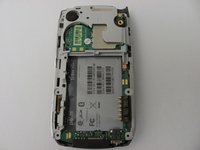
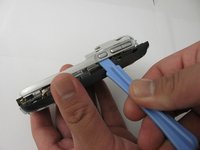
Using the plastic opening tool, gently separate the back case from the phone body.
-
-
-
-
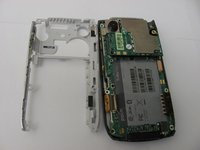
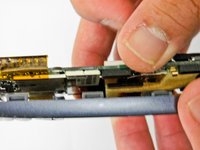
Using a plastic opening tool, gently edge your way between the back and border case (Picture 2) until they are completely separated (Picture 3).
-
-
-
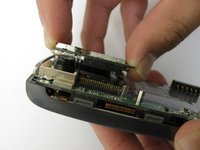
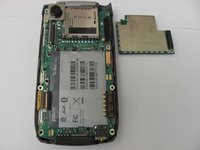
Remove the antenna chip by unscrewing the two screws with Torx T-5 screwdriver (Picture 1).
-
Once unscrewed, gently detach the antenna chip with your hands (Picture 2).
-
-
-
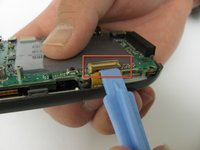
Use the plastic opening tool to unlock the tab holding the keyboard connection (Picture 1).
-
Once the keyboard connection is detached, use your hands to gently separate the motherboard from the back panel (Picture 2).
-
-
-
To completely detach the motherboard from the back panel, use the plastic opening tool to unlock the LCD connection from the motherboard (Picture 2).
-
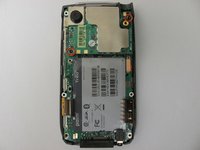
Once the LCD connection is unlocked, the motherboard should now be completely detached from the back panel, keyboard, and LCD (Picture 3).
-
-
-








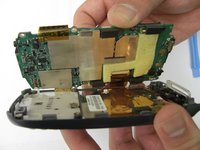
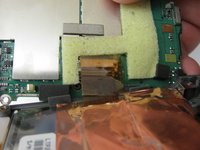
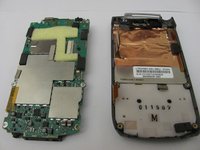


To reassemble your device, follow these instructions in reverse order.

Team

Cal Poly, Team 12-37, Regan Spring 2012 Member of Cal Poly, Team 12-37, Regan Spring 2012
CPSU-REGAN-S12S12G37
4 Members
84 Guides authored
1 Guide Comment
Does anyone know where or how to get a developers guide or geeks guide to tearing this phone down completely? I have a number of these, as well as old Galaxy Note phones, a broken S7 etc. And I would love to have the blueprint to know how to hack a LTE antenae, and S7 camera into my treo palm 700p..Wouldn't that be awesome? I still like it better than the modern smart phone, and just lost use of it when my carrier killed CDMA last week> :-(
