Free Shipping on Domestic Orders $75+

PSP E1000 Battery Replacement

What you need

    1. PSP E1000 Battery Replacement, Battery: step 1, image 1 of 2 PSP E1000 Battery Replacement, Battery: step 1, image 2 of 2
      • To start the replacement flip the device over

      Ask FixBot

      Add Comment

    2. PSP E1000 Battery Replacement: step 2, image 1 of 2 PSP E1000 Battery Replacement: step 2, image 2 of 2
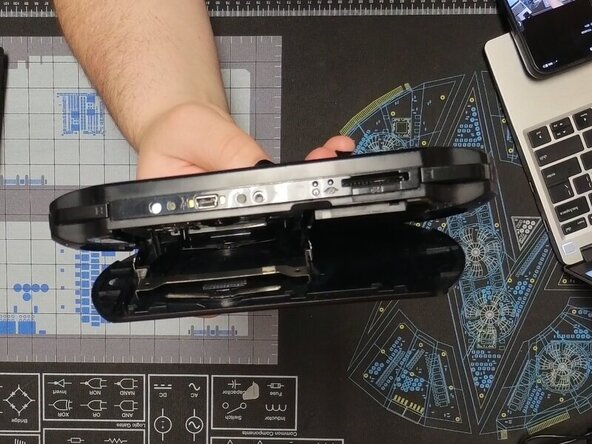
      • We are going to start by removing the back panel.

      • To do this open the panel and gently squeeze in the UMD tray until it pops up.

      • It should lay flat against the back panel while open if done correctly

      Ask FixBot

      Add Comment

    3. PSP E1000 Battery Replacement: step 3, image 1 of 2 PSP E1000 Battery Replacement: step 3, image 2 of 2
      • Gently bend the back panel to free the hinge on the left.

      • Once it is popped out it should look like the second photo

      Ask FixBot

      Add Comment

      • The back panel can then be slid off

      Ask FixBot

      Add Comment

    4. PSP E1000 Battery Replacement: step 5, image 1 of 3 PSP E1000 Battery Replacement: step 5, image 2 of 3 PSP E1000 Battery Replacement: step 5, image 3 of 3
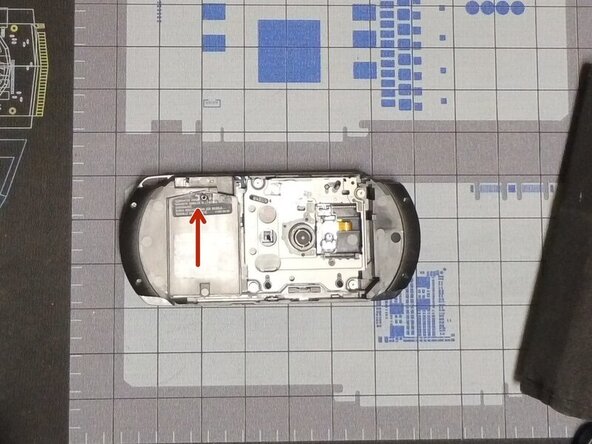
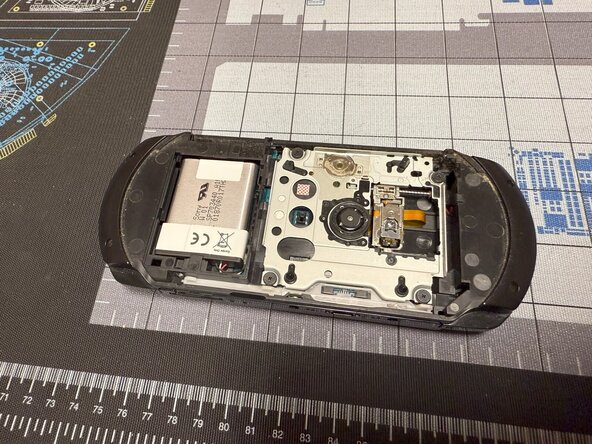
      • Remove the screw with a #00 Philips and slide up the battery cover.

      • The battery can now be removed by pulling it out.

      • When reinstalling, it is useful to use a spudger to push the cable back in.

      • Congratulations you have replaced your PSP E1000's battery

      Ask FixBot

      Add Comment

Conclusion

To reassemble your device, follow these instructions in reverse order.

Cancel: I did not complete this guide.

4 other people completed this guide.

Caleb Pierce

Member since: 04/19/22

1,290 Reputation

8 Guides authored

1 Guide Comment

Haleakala,akama

Micheal Churchill - Reply Share

Add Comment

View Statistics:

Past 24 Hours: 20

Past 7 Days: 93

Past 30 Days: 467

All Time: 5,675