15% Off Selected iFixit Tools — Limited Time
Free Shipping on Domestic Orders $75+

PSP 1000 Battery Replacement

What you need

  1. PSP 1000 Battery Replacement, Battery: step 1, image 1 of 1
    • Turn the PSP over so its back is facing you.

    Ask FixBot

    Add Comment

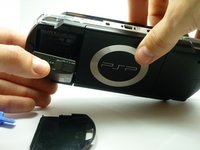
  2. PSP 1000 Battery Replacement: step 2, image 1 of 2 PSP 1000 Battery Replacement: step 2, image 2 of 2
    • Locate the battery casing button on the rear-left side of the PSP.

    • Press down the button and remove the battery cover.

    Ask FixBot

    Add Comment

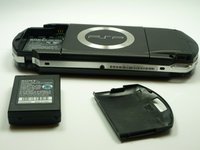
  3. PSP 1000 Battery Replacement: step 3, image 1 of 2 PSP 1000 Battery Replacement: step 3, image 2 of 2
    • Using your finger, remove the battery upwards from the system as shown.

    Ask FixBot

    Add Comment

Conclusion

To reassemble your device, follow these instructions in reverse order.

Cancel: I did not complete this guide.

44 other people completed this guide.

Stephen Kazim

Member since: 01/14/10

2,176 Reputation

1 Guide authored

Team

Cal Poly, Team 5-6, Forte Winter 2010 Member of Cal Poly, Team 5-6, Forte Winter 2010

CPSU-FORTE-W10S5G6

5 Members

34 Guides authored

0 Guide Comments

Add Comment

View Statistics:

Past 24 Hours: 18

Past 7 Days: 94

Past 30 Days: 513

All Time: 62,435