Introduction
There is not much information out there about opening the ScanWatch (1st generation), so I am sharing the notes I made after buying a unit that had already been repaired for water damage. After the first shower, condensation showed up again.
Here is what I found out, especially how to open the watch and close it back up.
What you need
-
-
-
The watch is held together by friction and a thin black gasket. There are no screws or glue.
-
Place a thin metal smartphone opening tool between the metal case and the glass/display side of the watch, not on the sensor side.
-
Work your way around the watch carefully to release the gasket.
 Ask FixBot
-
-
-
Once the watch is open, you can see the movement and a small cable connecting the sensor to it.
-
The cable has an iPhone-like connector and can be released with a plastic spudger.
-
Carefully pry the connector straight up to avoid damage.
-
-
-
-
-
-
The watch is held together by friction and a thin black gasket. There are no screws or glue.
-
Place a thin metal smartphone opening tool between the metal case and the glass/display side of the watch, not on the sensor side.
-
Work your way around the watch carefully to release the gasket.
-
-
-
Once the watch is open, you can see the movement and a small cable connecting the sensor to it.
-
The cable has an iPhone-like connector and can be released with a plastic spudger.
-
Carefully pry the connector straight up to avoid damage.
-
-
-
The battery can be replaced, but it is soldered to the board.
-
You need soldering experience and the right tools.
-
-
-
Reconnect the sensor cable.
-
Make sure the O-ring gasket sits fully in the corner of the metal ring.
-
Press the glass and ring back in with even pressure. This may take force.
-
Remove any adhesive residue and let the adhesive cure if you used any.
-
-
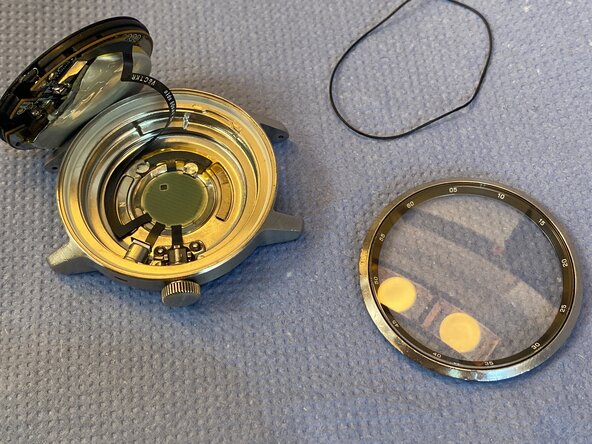

Hopefully the photos and the steps help. Withings does not offer much more information or support, so this guide fills in some of the gaps.
Have you found a better way to handle this repair? Share your experience in the comments so we can keep building our repair knowledge together.
Cancel: I did not complete this guide.
2 other people completed this guide.

6 Guide Comments
Where can I find the saphire glass if its broken?
