Introduction
These instructions describe how to open the razor enclosure. This is a prerequisite for further steps such as replacing the battery or the drive.
What you need
-
-
-
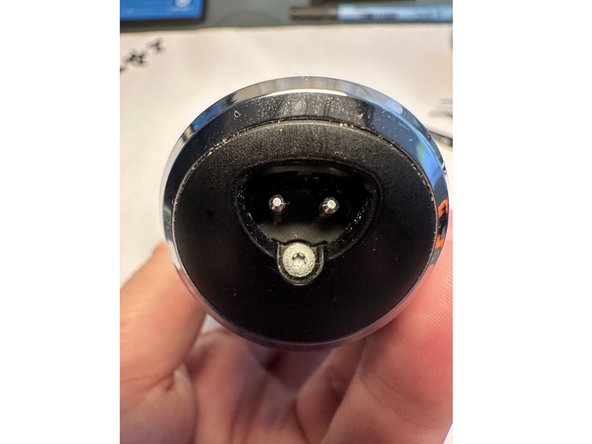
To do this, unfasten and remove the Torx T6 screw
-
Then pull off the cover.
 Ask FixBot
-
-
-
To do this, extend the trimmer, i.e., push it upward from the bottom position toward the shaving head (red arrow)
-
Pull (green arrows) the covers on the left and right of the trimmer over the retaining pins (green rings)
-
Then pull them downward toward the bottom to remove them.
-
-
-
-
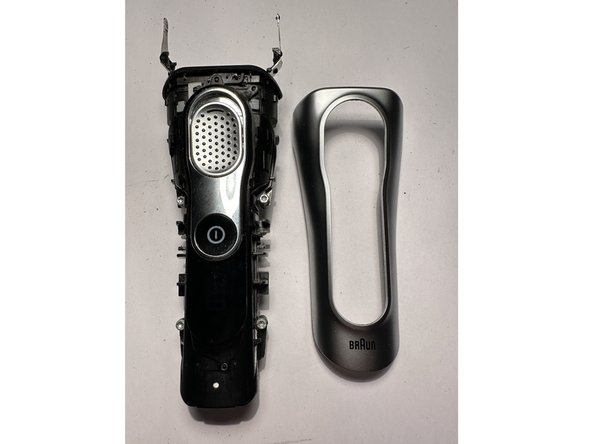
Remove the upper side panels of the front outer trim on the left and right.
-
-
-
Remove the front enclosure cover (outer panel). To do this, carefully pry the three side eyelets on the left and right slightly over the retaining tabs with a spatula.
-
Carefully lift off the enclosure cover.
-
-
-
Remove the switch cover. To do this, carefully pry the retaining tabs on the left and right over the retaining lugs.
-
Then lift off the exposed rocker switch at the top.
-
-
-
To do this, remove the four Torx T8 screws that are visible on the front left and right sides.
-
The tongue and groove opposite the case and cover can be pushed apart using a spatula.
-
The positive terminal of the 18500 cell points downward (shaving head at the top).
-
-




Follow the steps in reverse order to reassemble your device.
Cancel: I did not complete this guide.
3 other people completed this guide.
Special thanks to these translators:
100%

oldturkey03 is helping us fix the world! Want to contribute?
Start translating ›

