
One Education Infinity:One Keyboard Frame Prerequisite

Taylor Bratsch and
Last updated on Dec 2, 2016
Views: 211
View statistics:
- Past 24 Hours:
- 0
- Past 7 Days:
- 0
- Past 30 Days:
- 3
- All Time:
- 211
Comments: 0
No one has left comments on this guide. Will you be first?
Go to guide commentsCompleted: 0 1
No one has marked this guide "completed." Will you be the first?
1 person has marked this guide "completed." It's you — great job!
Favorites: 0 1
No one has favorited (and subscribed to) this guide. Will you be the first?
1 person has favorited (and subscribed to) this guide — and that's you!
Prerequisite Only
This is a prerequisite-only guide! This guide is part of another procedure and isn’t meant to be used alone.
Introduction
Go to step 1 ↓This guide is a prerequisite for the One Education Infinity:One keyboard and touchpad replacement guides.
What you need
Tools


-
-
-
Use a spudger to pry the four rubber pads away from the bottom of the case.
-
Use a Phillips #00 screwdriver to unscrew the four 6.4 mm screws.
 Ask FixBot
-
-
-
Insert a Jimmy or other prying tool into the seam on the edge of the casing.
-
Trace along the edges of the device until all clips are released.
-
Lift the back case away from the device.
-
-
-
Use a Phillips #00 screwdriver to unscrew the four 6.4mm screws on the hinge mounts.
-
-
Tool used on this step:Tweezers$4.99
-
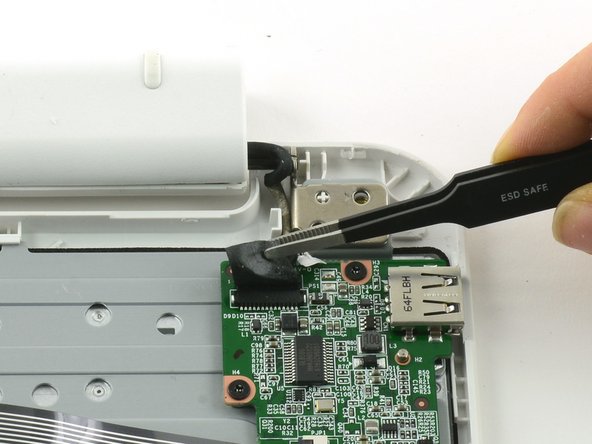
Use tweezers to lift the fabric cover and hinge connector away from the daughterboard.
-
-
-
-
-
-
Flip up the black retaining flap on the ZIF connector holding the large grey ribbon cable in place.
-
Pull the ribbon cable straight out of the ZIF connector.
-
-
Tool used on this step:Tweezers$4.99
-
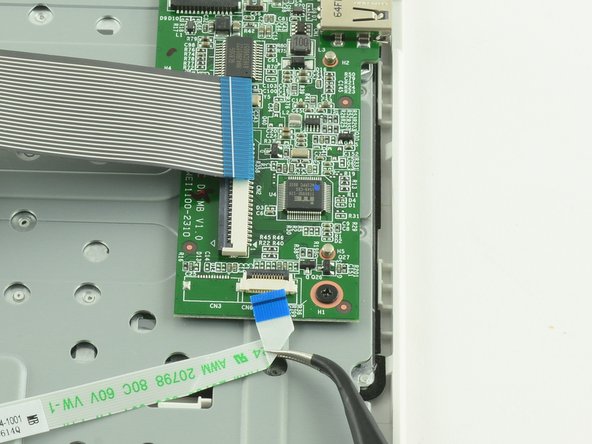
Use the flat end of a spudger to flip up the black tab on the smaller ZIF connector.
-
Use tweezers to pull the ribbon cable straight out of the connector.
-
-
-
Use a Phillips #000 screwdriver to unscrew the three 3.4mm screws.
-
Lift the daughterboard away from the device to remove.
-
-
-
-
-
Use a spudger to lift up the black retaining flap on the touchpad's ZIF connector.
-
Pull the ribbon cable straight back to remove.
-
-
-
Use a Phillips #00 screwdriver to unscrew the four 6.4mm screws holding the touchpad in place.
-
-
-
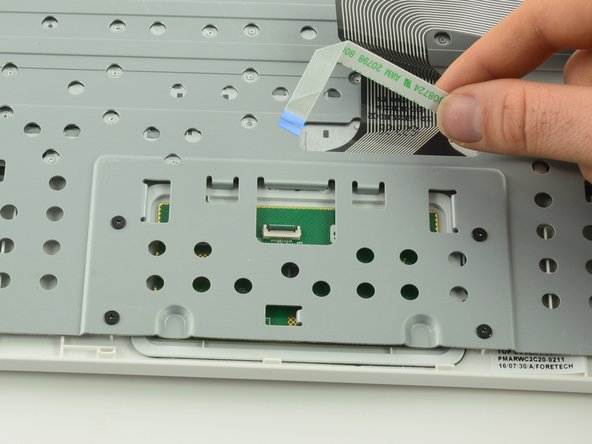
Feed the ribbon cable through the hole in the metal frame.
-
Left the metal frame away from the device.
-
-








To reassemble your device, follow these instructions in reverse order.

